

 Get 0.05 TON 💎
Earlier Versions
| Name | Size | Uploaded | Game Version | Downloads | |
| SignShopHotel v3.0.0 release | 49.17 KB | Apr 6, 2020 | 1.15 | 943 |  Download Download |
| SignShopHotel v1.2.0 release | 58.32 KB | Jan 20, 2015 | 1.8.1 | 7,588 | Download |
| SignShopHotel v1.1.0 release | 47.76 KB | May 18, 2014 | CB 1.7.9-R0.1 | 3,982 | Download |
| SignShopHotel v1.0.6 release | 46.07 KB | Jan 28, 2014 | CB 1.7.2-R0.2 | 2,788 | Download |
| SignShopHotel v1.0.5 release | 45.58 KB | Dec 1, 2013 | CB 1.6.4-R2.0 | 1,519 | Download |
| SignShopHotel v1.0.4 release | 44.39 KB | Oct 16, 2013 | 1.6.4 | 970 | Download |
| SignShopHotel v1.0.3 release | 43.40 KB | Sep 8, 2013 | CB 1.6.2-R0.1 | 1,642 | Download |
| SignShopHotel v1.0.2 release | 38.03 KB | Jun 3, 2013 | CB 1.5.2-R0.1 | 3,043 | Download |
| SignShopHotel v1.0.1 release | 39.59 KB | Apr 25, 2013 | CB 1.5.1-R0.2 | 1,513 | Download |
| SignShopHotel v1.0 release | 39.06 KB | Mar 10, 2013 | CB 1.4.7-R1.0 | 1,761 | Download |
Screenshots
Description

This is an extension plugin to SignShop (which is required). It allows you to link doors with SignShops, and rent the use of that door for a certain amount of time.
Main | SignShopHotel | SignShopGuardian | Features | FAQ | Signs | Permissions | Config | Localization | Developer API | Issues / Suggestions
How does it work?
Step 1: Drop SignShopHotel.jar into your plugins folder (make sure you also have SignShop installed).
Step 2: Create a sign with the following format:
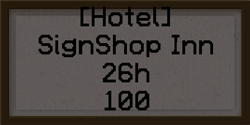
- "[Hotel]"
- The name of your hotel (you should use the same name for multiple rooms in the same building, that way the signs will all be numbered correctly)
- The amount of time you would like to rent the room for "s", "m", "h", "d", "w" (for seconds, minutes, hours, days, and weeks, respectively)
- The price you would like to charge to rent the room
Step 3: Punch a door with redstone (Note: If you are using an Iron door, you have to punch the button or plate near it).
Step 4: Punch the sign with redstone. The sign will change, and the room will be ready to rent.
Optional Step: Add a pressure plate inside of the room so players don't get trapped inside when their time runs out.
Commands
| Command | Description |
|---|---|
| /signshophotel boot [player] | If a player is not specified it will boot the renter of the sign you are looking at. If a player is specified, it will boot them from ALL rooms they have rented. |
Questions, Comments, and Other Issues
Please visit our main page to get help, or open up a ticket for SignShopHotel.



Add a comment