

 Get 0.05 TON 💎
Earlier Versions
| Name | Size | Uploaded | Game Version | Downloads | |
| 1.17.1 v1.7.0 release | 28.72 KB | Nov 24, 2021 | 1.17.1 | 971 |  Download Download |
| 1.16.5 v1.6.4 release | 29.82 KB | Jun 5, 2021 | 1.16.5 | 49,980 | Download |
| 1.16.5 v.1.6.3 release | 28.37 KB | May 28, 2021 | 1.16.5 | 4,469 | Download |
| 1.16.5 v1.6.2 release | 28.32 KB | May 22, 2021 | 1.16.5 | 250 | Download |
| 1.16.5 v1.6.1 release | 28.02 KB | May 16, 2021 | 1.16.5 | 309 | Download |
| 1.16.5 v1.6.0 release | 27.98 KB | May 14, 2021 | 1.16.5 | 939 | Download |
| 1.16.5 v1.5.0 release | 27.76 KB | May 4, 2021 | 1.16.5 | 5,767 | Download |
| 1.16.5 v1.4.0 release | 19.18 KB | Apr 24, 2021 | 1.16.5 | 6,071 | Download |
| 1.16.5 v1.3.0 release | 16.82 KB | Apr 24, 2021 | 1.16.5 | 46 | Download |
| 1.16.5 v1.2.2 release | 16.38 KB | Apr 24, 2021 | 1.16.5 | 29 | Download |
| 1.16.5 v1.2.1 release | 16.16 KB | Apr 23, 2021 | 1.16.5 | 34 | Download |
| 1.16.5 v1.2.0 release | 14.94 KB | Apr 22, 2021 | 1.16.5 | 26 | Download |
| 1.16.5 v1.1.1 release | 12.86 KB | Apr 21, 2021 | 1.16.5 | 26 | Download |
| 1.16.5 v1.1.0 release | 12.67 KB | Apr 15, 2021 | 1.16.5 | 2,973 | Download |
| 1.16.5 v1.0.0 release | 6.14 KB | Apr 12, 2021 | 1.16.5 | 43 | Download |
Screenshots


Description
SmoothFocus is a Forge mod that aims to improve the default Optifine zoom.
When holding down the Zoom key (defaulted at J, configurable in controls) and scrolling your mouse, it will smoothly zoom in or out.
Double tapping the Zoom key will cause the FOV increase to toggle. Tap the Zoom key again to toggle it off.
While zooming, the camera movements will be smoothed.
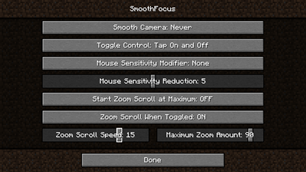
In the config you can change:
- Mouse sensitivity reduction
- Camera smoothing options
- Maximum zoom
- Scroll speed
- Toggle Control
- And more
A keybind is assignable to open the config screen in-game, so you can configure the settings without reloading your world.
This mod is Client-Side only, so it will function on servers without the server needing it installed.
Update Notes:
– Do not try to activate Optifine zoom and Smoothfocus zoom at the same time on any version below 1.4.0. Upon deactivation, you will be stuck on the smooth camera effect. Fix it by using "toggle cinematic camera." This is fixed in 1.4.0 and beyond.
– When updating to 1.6.0 it is recommended that you re-configure the maximum zoom
Changelog:
1.1.0:
Added a ton of new configuration options along with a smoothing feature. All of these can be configured by clicking "config" while SmoothFocus is selected in the Mods Tab. The Zoom Keybind is still configurable in controls.
1.2.0:
Implemented a new "scroll on toggle" option that allows you to zoom out while toggled.
1.3.0:
Added two new config options. "Start at max zoom" will cause you to zoom in all the way when the keybind is pressed, and "Disable toggle" will remove the toggle completely.
1.4.0
Fixed bugs related to synchronous Optifine zooming. You can now SmoothFocus zoom while Optifine zooming and vice versa.
1.5.0
Bug Fixes:
- Fixed "FOV Effects" slider compatibility
– Made zooming only stop when the game is paused
Features:
– Changed the config to fit on one screen, improving aesthetics.
– Removed some config options to make the choices less redundant
– Added a mouse sensitivity reduction
– Created a keybind to open the config screen without having to exit the game. This is set to nothing by default but can be changed in controls.
1.6.0
Bugs:
– Fixed typos
Features:
– Increased the zoom capabilities
– It is recommended that you re-configure the max zoom after updating, as it will probably be too high
Bugs? Suggestions? Leave a comment or open an issue on GitHub
Enjoy!



Add a comment