


 Get 0.05 TON 💎
Earlier Versions
| Name | Size | Uploaded | Game Version | Downloads | |
| sophisticatedstorage-1.19.2-0.5.12.138.jar release | 579.15 KB | Aug 31, 2022 | 1.19.2 | 1 |  Download Download |
| sophisticatedstorage-1.18.2-0.5.11.137.jar release | 583.71 KB | Aug 31, 2022 | 1.18.2 | 1 | Download |
| sophisticatedstorage-1.19.2-0.5.10.129.jar release | 578.83 KB | Aug 29, 2022 | 1.19.2 | 965 | Download |
| sophisticatedstorage-1.18.2-0.5.9.130.jar release | 583.38 KB | Aug 29, 2022 | 1.18.2 | 1,244 | Download |
| sophisticatedstorage-1.19.2-0.5.1.106.jar release | 560.55 KB | Aug 12, 2022 | 1.19.2 | 5,309 | Download |
| sophisticatedstorage-1.18.2-0.5.1.107.jar release | 565.21 KB | Aug 12, 2022 | 1.18.2 | 79,751 | Download |
| sophisticatedstorage-1.19.2-0.4.9.97.jar release | 533.18 KB | Aug 11, 2022 | 1.19.2 | 505 | Download |
| sophisticatedstorage-1.19-0.4.9.94.jar release | 533.18 KB | Jul 27, 2022 | 1.19.1 | 4,040 | Download |
| sophisticatedstorage-1.18.2-0.4.8.93.jar release | 537.91 KB | Jul 27, 2022 | 1.18.2 | 116,661 | Download |
| sophisticatedstorage-1.19-0.4.6.84.jar release | 532.98 KB | Jul 20, 2022 | 1.19 | 1,494 | Download |
| sophisticatedstorage-1.18.2-0.4.5.82.jar release | 537.70 KB | Jul 20, 2022 | 1.18.2 | 54,387 | Download |
| sophisticatedstorage-1.18.2-0.4.3.77.jar release | 537.08 KB | Jul 20, 2022 | 1.18.2 | 1,182 | Download |
| sophisticatedstorage-1.19-0.4.4.73.jar release | 529.06 KB | Jul 19, 2022 | 1.19 | 970 | Download |
| sophisticatedstorage-1.19-0.3.7.65.jar release | 505.72 KB | Jul 12, 2022 | 1.19 | 1,113 | Download |
| sophisticatedstorage-1.19-0.3.6.63.jar release | 505.71 KB | Jul 10, 2022 | 1.19 | 564 | Download |
| sophisticatedstorage-1.19-0.3.5.57.jar release | 505.82 KB | Jun 19, 2022 | 1.19 | 8,754 | Download |
| sophisticatedstorage-1.19-0.3.4.55.jar release | 505.82 KB | Jun 18, 2022 | 1.19 | 824 | Download |
| sophisticatedstorage-1.18.2-0.3.4.49.jar release | 509.12 KB | Jun 13, 2022 | 1.18.2 | 341,384 | Download |
| sophisticatedstorage-1.18.2-0.3.2.45.jar release | 509.57 KB | Jun 10, 2022 | 1.18.2 | 33,852 | Download |
| sophisticatedstorage-1.18.2-0.1.1.35.jar release | 480.42 KB | May 28, 2022 | 1.18.2 | 137,468 | Download |
| sophisticatedstorage-1.18.2-0.0.16.30.jar release | 480.39 KB | May 22, 2022 | 1.18.2 | 60,851 | Download |
| sophisticatedstorage-1.18.2-0.0.11.26.jar release | 478.48 KB | May 18, 2022 | 1.18.2 | 22,423 | Download |
| sophisticatedstorage-1.18.2-0.0.10.22.jar release | 475.66 KB | May 16, 2022 | 1.18.2 | 13,087 | Download |
| sophisticatedstorage-1.18.2-0.0.7.18.jar release | 473.42 KB | May 10, 2022 | 1.18.2 | 44,409 | Download |
| sophisticatedstorage-1.18.2-0.0.6.16.jar release | 473.33 KB | May 8, 2022 | 1.18.2 | 35,116 | Download |
| sophisticatedstorage-1.18.2-0.0.5.13.jar release | 473.80 KB | May 7, 2022 | 1.18.2 | 402 | Download |
| sophisticatedstorage-1.18.2-0.0.4.11.jar release | 471.17 KB | May 5, 2022 | 1.18.2 | 17,901 | Download |
Screenshots


Description
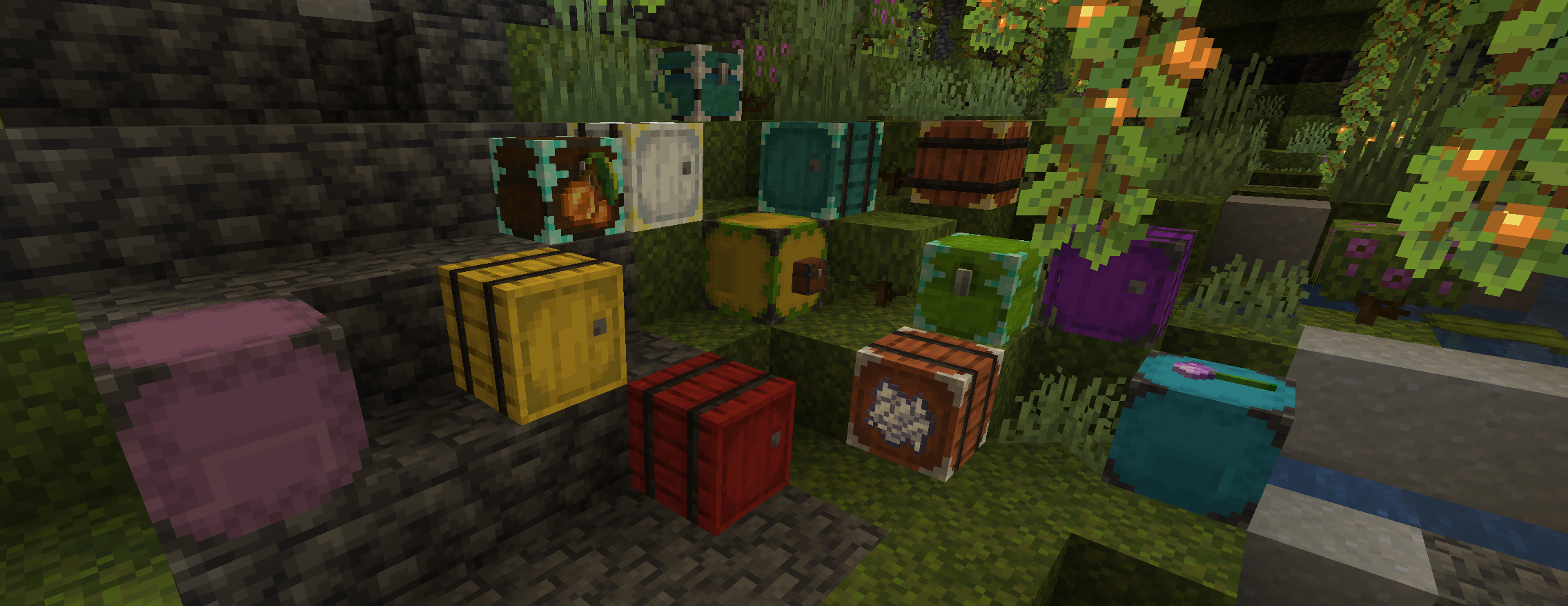
Sophisticated Storage is mod that adds multiple tiers of Barrels, Chests and Shulker Boxes, any of these can have many different combinations of two colors applied to them and barren/chest come in different wood varieties and in addition to that you can use many different upgrades in them to augment their functionality.
Configuration
There is a lot of things you can change through mod’s config
- Number of inventory and upgrade slots of each of the storage blocks
- Number of filter slots in many of the upgrades
- Range, speed and some additional features of different upgrades
- And if any storage/upgrade doesn’t fit a theme of your modpack you can disable them in the config to disable recipes and hide them from creative menu / jei
Come over to our Discord server to discuss this mod or others that I maintain

Dyeing the storage blocks in crafting table
- Color of multiple dyes in recipe gets combined similar to how it works for coloring leather armor except each of these can have two colors – main and accent
- Dyes to the left of the storage in the recipe apply to the main color
- Dyes to the right apply to the accent color of the storage
- Dyes in the same column apply to both
- And once dyed you can continue adding dyes which combine with the current main color, accent color or both
Upgrades
Pickup Upgrade
Picks up items that come in contact with the storage block and match the filter


- Regular upgrade can only filter by item and has 9 filter slots
- Advanced one has more filtering options – match by item/mod/tags, match nbt, match damage and 16 slots that can be used to filter
Magnet Upgrade
Variant of pickup that teleports items around the storage block directly into it


- Regular upgrade can only filter by item and has 9 filter slots
- Advanced one has bigger magnet range more filtering options – match by item/mod/tags, match nbt, match damage and 16 slots that can be used to filter
Filter Upgrade
Can be used to limit what can be piped into / out of storage block


- Regular upgrade can only filter by item and has 9 filter slots
- Advanced one has more filtering options – match by item/mod/tags, match nbt, match damage and 16 slots that can be used to filter
Void Upgrade
Does exactly what you would expect – voids items that are picked up based on its filter


- Regular upgrade can only filter by item and has 9 filter slots
- Advanced one has more filtering options – match by item/mod/tags, match nbt, match damage and 16 slots that can be used to filter
- There’s also an option to turn on off voiding of items that are inserted through storage block’s gui, like if you want to add a stack of some item and keep it there, but don’t want any new ones to be inserted
Compacting Upgrade
Compacts items using 2×2 and 3×3 recipes, usually coal, redstone and similar


- Regular upgrade only has 9 filter slots and can only compact items using 2×2 recipes
- Advanced one has 16 slots and can compact items using both 2×2 and 3×3 recipes
- There’s also a switch for whether to have items compacted only when inserted by other upgrades/pipes or whether the compacting should also happen when inserting the items in storage block’s gui
- And another switch that allows to compact also items which cannot be uncompacted back (by default will only compact those that can be uncrafted)
Feeding upgrade
Feeds players with food from the block’s inventory when the player gets hungry


- Has filters to allow limiting what food items should be fed to player (pretty useful in case you’re picking up stuff like rotten flesh and similar with negative effects)
- Advanced one allows more precise settings for when the player is to be fed – immediate when hurt on/off, setting for how much hunger needs to go down compared to the hunger that the food restores
Smelting/Smoking/Blasting Upgrades
Furnace in storage block which can also work automatically


- Regular upgrade works just as furnace would
- Auto smelting one will automatically pull fuel, items to smelt and will automatically push smelted items back into the block’s inventory
- It also has filters for fuel and what items to smelt
- Smoking/Blasting upgrades work similar but with double speed and just for items that would go into vanilla smoker / blasting furnace
Crafting Upgrade
Crafting table in upgrade tab

- Integration with crafting tweaks and mouse tweaks
- Also has performance enhancements that make it faster in crafting than vanilla workbench
Stonecutter Upgrade
Stonecutter in upgrade tab

- Also remembers the last recipe used
- If the same block is inserted it will preselect that recipe
- So stonecutting multiple stacks of the same block is much faster
Stack Upgrade
Makes it possible to fit more in the inventory slots


- Multiplies the max stack size limit by a value
- Tier 1 – 2x, tier 2 – 4x, tier 3 – 8x, tier 4 – 16x
- Multiple stack upgrades can be put in upgrade slots and their multipliers get multiplied 🙂
- e.g. 2 tier 2 upgrades = 16x max stack size value
- Shift clicking from the oversized stack out will only move a max of one regular stack
- To move as much as possible you can use Ctrl Shift Click
Jukebox Upgrade
Allows to play music discs in upgrade tab

Mod spotlight from Mischief of Mice
Add a comment