


 Get 0.05 TON 💎
Earlier Versions
| Name | Size | Uploaded | Game Version | Downloads | |
| SortStack-0.63 release | 9.89 KB | Apr 10, 2013 | CB 1.5.1-R0.1 | 2,950 |  Download |
| SortStack-0.5 release | 16.00 KB | Sep 20, 2012 | CB 1.3.2-R0.1 | 1,004 | Download |
| SortStack-0.3 release | 15.38 KB | Jun 18, 2012 | CB 1.2.5-R4.0 | 1,304 | Download |
| SortStack-0.2 release | 14.99 KB | May 16, 2012 | CB 1.2.5-R1.2 | 980 | Download |
| SortStack-0.1 release | 14.98 KB | May 8, 2012 | CB 1.2.5-R1.2 | 877 | Download |
Screenshots


Description
SortStack
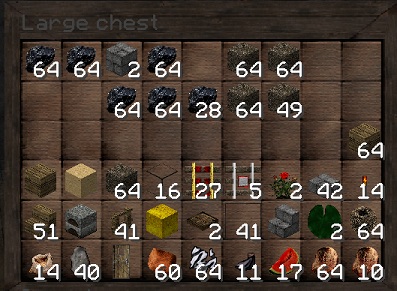
Pre-Sort View:
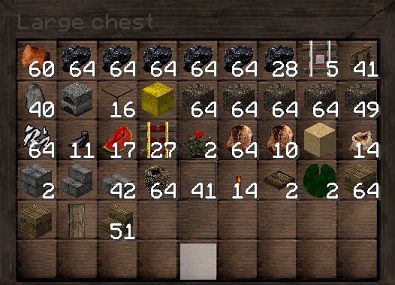
Post-Sort View:
Current Version: 0.63
Overview
SortStack allows users the ability to sort and combine stacks in their inventory window, chests, dispensers etc. Using a pre-defined keyboard key of S (KEY_S) you can easily sort and combine incomplete stacks of items on the fly easily and effectively. This plugin also allows you to create stacks of items you normally cannot stack such as certain foods, armor, weapons, tools, vehicles, buckets etc.
How to Use?
Install the SortStack plugin into your servers plugin direction and start your server. The config.yml file is automatically created with a pre-defined sort stack order.
Why not use the built-in sort feature?
- This plugin allows the server administrator to pre-set the order list.
- This plugin allows for stacking of items that normally isn't supported. Good when your making high-quantity items such as doors, Mushroom Soup etc that normally cannot be stacked. Also great for doing Armor/Weapon/Tool shops etc.
Configuration
File: config.yml
- DisplaySortAchievement: Enables or Disables the the "Items Sorted" notification on users screen.
- Tools: This numeric formatted item contains the item ID's for stacking tools
- Weapons: This numeric formatted item contains the item ID's for stacking weapons.
- Armors: This numeric formatted item contains the item ID's for stacking armors.
- Foods: This numeric formatted item contains the item ID's for stacking foods.
- Vehicles: This numeric formatted item contains the item ID's for stacking vehicles
- Buckets: This numeric formatted item contains the item ID's for stacking buckets.
- SortSEQ: Contains the core list of minecraft materials and the order to sort them in. Be careful errors on this line can cause unpredictable results with sort.
Permissions
Here's a list of specific permissions nodes for this plugin and what each does.
- sortstack.sort = Allows the users to use SortStack Feature.
- sortstack.stack.tools = Allows users to Stack Tools
- sortstack.stack.weapons = Allows users to Stack Weapons
- sortstack.stack.buckets = Allows users to Stack Buckets
- sortstack.stack.armors = Allows users to Stack Armors
- sortstack.stack.foods = Allows users to Stack Foods
- sortstack.stack.vehicles = Allows users to Stack Vehicles
- sortstack.* = Allows users to have access to all of SortStacks Abilities.
Dependencies
- Spoutcraft Client
- SpoutPlugin
To Do
I still need to add in the ability for users to change the key currently assigned to the sort feature.
Add a comment