


 Get 0.05 TON 💎
Earlier Versions
| Name | Size | Uploaded | Game Version | Downloads | |
| teamsmod-1.15.2-hotfix-2 release | 130.06 KB | Aug 18, 2020 | 1.15.2 | 25,435 |  Download Download |
| teamsmod-1.12.2-hotfix-2 release | 132.06 KB | Aug 18, 2020 | 1.12.2 | 44,520 | Download |
| Teams-1.15.2-R2-hotfix release | 130.00 KB | Jun 19, 2020 | 1.15.2 | 12,024 | Download |
| Teams-1.12.2-hotfix release | 133.63 KB | Jun 19, 2020 | 1.12.2 | 2,393 | Download |
| Teams 1.15.2-R2 release | 129.90 KB | Jun 8, 2020 | 1.15.2 | 504 | Download |
| Teams 1.12.2-final release | 133.11 KB | May 31, 2020 | 1.12.2 | 1,933 | Download |
| Teams 1.15.2-R1 release | 117.72 KB | May 19, 2020 | 1.15.2 | 1,613 | Download |
| Teams 1.4.5 release | 82.22 KB | May 9, 2020 | 1.12.2 | 749 | Download |
| teams-2.0.1-b2 beta | 133.07 KB | Jan 12, 2022 | 1.18.1 | 64 | Download |
| teams-2.0.0-b2 beta | 128.11 KB | Jan 6, 2022 | 1.18.1 | 127 | Download |
| teams-2.0.0-b1 beta | 127.91 KB | Jan 6, 2022 | 1.18.1 | 37 | Download |
| Teams 1.7 beta | 99.58 KB | May 8, 2020 | 1.15.2 | 234 | Download |
| Teams 1.6 beta | 89.64 KB | May 6, 2020 | 1.15.2 | 60 | Download |
Screenshots


Description
Teams
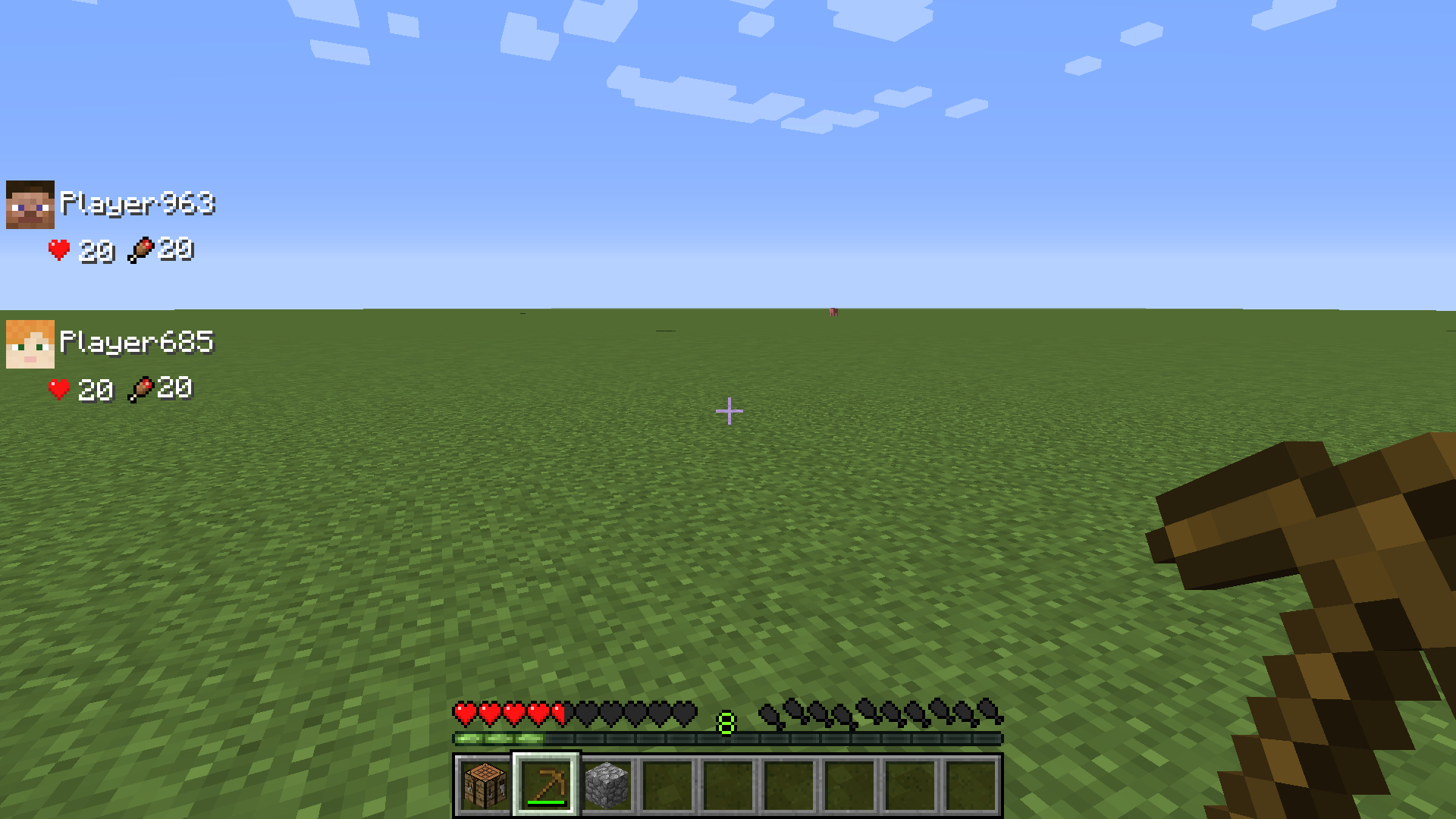
Teams is a mod that allows the simple, intuitive creation of teams of players, enabling numerous QOL changes for social play. These changes include a HUD showing your friends health and hunger, item transferring over a distance, chat bubbles and pinging, advancement sharing and more.
Everyone is different, so this mod has been designed to be highly configurable both on the server side and client
Advancement Sharing (toggleable)
Similar to that of the popular mod "Together Forever"
- Included in the mod just so people don't have to have multiple teams in multiple different mods and I know it's a popular feature
- Should work very consistently, I don't even have a force sync command because it should never be required.
- Advancements sync whenever a teammate joins the world, joins the team, gets an advancement, etc.
HUD Overlay (toggleable)
- HUD overlay shows you the health and hunger of up to 4 nearby alive teammates
- In addition to being toggleable in the config, you can temporarily hide the HUD by pressing "v" by default

Commands
- /teamsmod create <teamname> : creates team of "teamname" and automatically adds you to it
- /teamsmod invite <playername> : invites player "playername" to your team
- /teamsmod accept : accepts invitation to a team
- /teamsmod list : lists all teams
- /teamsmod info <teamname> : lists all players in team "teamname"
- /teamsmod player <playername> : gets team of player <playername>
- /teamsmod remove <teamname> : removes the team "teamname"
Teams GUI
Teams button appears in inventory screen (with toggleable size)
This button opens a menu allowing you to:
- Create a team (showing you the taken team names)
- Invite a player to your team (showing nearby eligible players)
- Leave your team
- List teams and players within them
- Transfer items to players within your team through GUI
Configure order / priority of players in Status Overlay
Miscellaneous
- PvP is disabled for teammates (toggleable)
- Sounds are broadcast when your teammate dies (toggleable)
- Player Pinging: When your name is typed in chat, the message becomes bold and you hear a sound (toggleable)
- Team Pinging: When the name of your team is typed in chat, the message becomes bold and you hear a sound (toggleable)
- Prefix: When a message is sent from a player in a team, they get a prefix with their team name (toggleable)
- Chat Bubbles: When a player sends a message, that message is displayed above their head for 10 seconds (toggleable)

Add a comment