


 Get 0.05 TON 💎
Earlier Versions
| Name | Size | Uploaded | Game Version | Downloads | |
| TooManyOres-1.7.10-1.0.7 release | 9.91 KB | Jan 31, 2016 | 1.7.10 | 6,288 |  Download Download |
| TooManyOres-1.8.9-2.0.0 release | 9.08 KB | Jan 28, 2016 | 1.8.9 | 4,661 | Download |
| TooManyOres-1.7.10-1.0.6 release | 9.93 KB | Jan 28, 2016 | 1.7.10 | 169 | Download |
| TooManyOres-1.7.10-1.0.5 release | 9.90 KB | Jan 3, 2016 | 1.7.10 | 275 | Download |
| TooManyOres-1.7.10-1.0.3 release | 5.51 KB | Dec 31, 2015 | 1.7.10 | 154 | Download |
| TooManyOres-1.7.10-1.0.2 release | 4.27 KB | Dec 30, 2015 | 1.7.10 | 1,551 | Download |
| TooManyOres-1.7.10-1.0.1 release | 4.18 KB | Dec 30, 2015 | 1.7.10 | 153 | Download |
| TooManyOres-1.7.10-1.0.0 release | 4.08 KB | Dec 30, 2015 | 1.7.10 | 454 | Download |
| TooManyOres-1.7.10-1.0.4 beta | 8.59 KB | Jan 1, 2016 | 1.7.10 | 487 | Download |
Description
This is a simple mod which will allow you to easily view which mods are adding ores into the world gen and disable the spawning of vanilla ores.
This mod can be run on servers without the client having the mod. Yes, it's serverside only (Except for singleplayer where they need it obviously)
Disable spawn of vanilla ores [As of 1.0.4]:
This mod allows you to disable the spawning of ores via the config. Start minecraft once and then navigate to minecraft\configs\toomanyores.cfg
From there you will be able to disable the spawning of ores
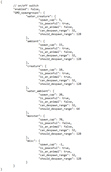
The ores file:
After launching the first time, the file can be found in minecraft\toomanyores\ores.txt
Why is this useful?
– Clearly lists all ores grouped with their type, e.g. copper,tin.
– No need to sort through NEIs ore dump
– It was made by me 😛
Future plans:
- Get a logo that looks good
- Add support for ores not following standard oreDict
- Neaten up txt file
- Possibly add other files?
Yes this is my first mod. Yes it probably isn't great. Yes I want feedback. Yes yes yes.



Add a comment