


 Get 0.05 TON 💎
Earlier Versions
| Name | Size | Uploaded | Game Version | Downloads | |
| TwitchIRC 0.4.1 CB1.7.2 beta | 53.54 KB | Jan 27, 2014 | CB 1.7.2-R0.2 | 1,676 |  Download Download |
| TwitchIRC 0.4.0 CB1.7.2 beta | 53.44 KB | Jan 26, 2014 | CB 1.7.2-R0.2 | 173 | Download |
| TwitchIRC 0.3.0 CB1.7.2/1.6.4 beta | 45.76 KB | Dec 17, 2013 | 1.7.2 | 307 | Download |
| TwitchIRC 0.2.6 beta | 52.06 KB | Jul 14, 2013 | 1.6.2 | 428 | Download |
| TwitchIRC 0.2.6 beta | 51.98 KB | Apr 6, 2013 | CB 1.5.1-R0.1 | 584 | Download |
| TwitchIRC 0.2.6 beta | 51.98 KB | Apr 6, 2013 | CB 1.4.7-R1.0 | 158 | Download |
| TwitchIRC 0.2.5 beta | 50.80 KB | Apr 3, 2013 | 1.5.1 | 148 | Download |
| TwitchIRC 0.2.5 beta | 51.23 KB | Apr 2, 2013 | CB 1.4.7-R1.0 | 158 | Download |
| TwitchIRC 0.2.4 beta | 50.85 KB | Mar 30, 2013 | 1.5.1 | 130 | Download |
| TwitchIRC 0.2.4 beta | 50.14 KB | Mar 30, 2013 | CB 1.4.7-R1.0 | 97 | Download |
Description

This project is not affiliated, connected or associated with Twitch Interactive, Inc.
Status: Beta
As of 0.3.0 TwitchIRC requires OAuth token instead of normal password!
You can generate it here.
• Description
TwitchIRC is a bukkit plugin that allows you to chat on Twitch stream's chat!
• Screenshots
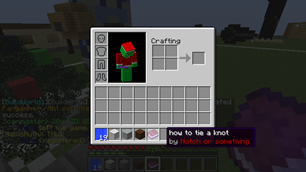
It's still in development, but here's a screenshot of how it looks now.
SS00|Screenshot 1
• Commands
| Command | Description |
|---|---|
| /tv toggle | Toggles TwitchIRC for user |
| /tv s <text> | Sends message to chat |
• Installation
- Copy TwitchIRC jar file to plugins/
- Edit config.yml in TwitchIRC folder (see Configuration section below)
- Start your server, it's done!
• Configuration
| Property | Default | Description |
|---|---|---|
| enabled | false | Change it to true after setting up config.yml |
| disable-normal-chat | false | Change it to true to disable normal Minecraft chat and (since 0.4.2) send all messages to Twitch instead. |
| join-message | true | Display message when somebody joins stream chat (since 0.4.0) |
| leave-message | true | Display message when somebody joins stream chat (since 0.4.0) |
| prefix | none | If none, default prefix will be used (you can use &[color-number]) |
| streamer-prefix | '[&6STREAMER&f]' | Prefix to be displayed before streamer's name in chat (you can use &[color-number]) (since 0.4.0) |
| mod-prefix | '[&aMOD&f]' | Prefix to be displayed before moderator's name in chat (you can use &[color-number]) (since 0.4.0) |
| login | LOGIN | Your Twitch login |
| oauth | OAUTH | Your Twitch OAuth token. You can get it here. |
| twitch-channel | CHANNEL | Twitch channel is streamer's name. If you want to use it for your stream, just enter here your login. |
| debug | false | If true, TwitchIRC will print connection details in console (for example your password). Recommended false. |
| enable-for-new-players | true | If true, TwitchIRC will be enabled for every new player (/tv toggle to disable/enable). |
| write-with-colon | true | If true, you'll be able to send messages to Twitch using ":Message" |
• Permissions
| Permission | Default | Description |
|---|---|---|
| tv.* | false | Gives access to all functions in TwitchIRC |
| tv.talk | op only | Allows you to send messages to Twitch |
| tv.read | true | Allows you to read messages from Twitch |
• Download

• Our plugins
TwitchIRC • PopChests

Add a comment