


 Get 0.05 TON 💎
Earlier Versions
| Name | Size | Uploaded | Game Version | Downloads | |
| VAI-v0.3 release | 14.30 KB | Jan 5, 2013 | CB 1.4.6-R0.3 | 1,521 |  Download |
| VAI-v0.2 release | 14.15 KB | Jan 2, 2013 | CB 1.4.6-R0.3 | 579 | Download |
| VAI-v0.1 release | 14.12 KB | Jan 2, 2013 | CB 1.4.6-R0.3 | 534 | Download |
Screenshots

Description

Vectron Artificial Intelligence
Features
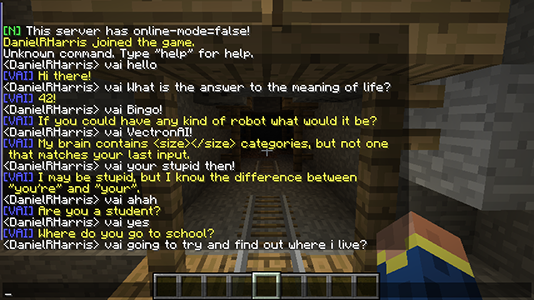
This plugin allows you to chat to an artificially intelligent bot of your choice. Choose a bot from the hundreds of thousands of available personalities, configurations, intelligence levels etc, or even create your own AI to fit your needs!
Example Chat:
Permissions
- vai.trigger – Allows you to query the chat bot.
Configuration
- bot-id – Sets the Pandora Bots bot id, simply switch out ids to switch bots. See below for some other default bot choices.
- bot-name – The bots name, as it appears in the chat prefix when the bot replies.
- bot-nick – The nickname players will be able to use to trigger the bot. A message would be formatted like this "[bot-nick] [message to send to bot]".
Bots:
- VectronAI – This is the default bot (in v0.3), it is based on the A.L.I.C.E bot and is constantly getting fun updates! – bot-id: dfeb9e548e34849c
- A.L.I.C.E – The core bot that the majority of other bots are based on. – bot-id: f5d922d97e345aa1
- Charlie – bot-id: e222218f9e356398
- Lauren – bot-id: f6d4afd83e34564d
- Jen – bot-id: fbb445b0fe3434fb
To find more bots, visit PandoraBots.com Most Popular Bots and select a bot from the list and click on it, then go to the bot page and in the URL bar, where it says ?botid=f5d922d97e345aa1, copy everything after the botid= and place it into your configuration instead of the default bot-id.
Using PandoraBots you can create your own bot; Google it, or just start playing around on PandoraBots.com, it's pretty easy!
If you enjoy this plugin, please consider donating some amount to show your appreciation and buy me a cup of coffee 😉

Thank you to ZNickQ for his awesome work on this 🙂
Add a comment