

 Get 0.05 TON 💎
Earlier Versions
| Name | Size | Uploaded | Game Version | Downloads | |
| WelcomeWarpSigns v1.3 release | 38.49 KB | Mar 23, 2017 | 1.11 | 7,527 |  Download Download |
| WelcomeWarpSigns v1.2 release | 38.32 KB | May 8, 2016 | 1.9 | 3,145 | Download |
Screenshots
Description
Welcome Warp Signs
Welcome Warp Signs are an easy way for players to make warps!
- Each player can have up to one warp active at a time
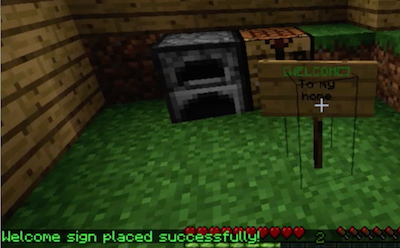
- Players create a warp by placing a sign that has [WELCOME] as the first line
- If the warp creation is successful, [WELCOME] will become green. Previous warp signs will be automatically deactivated.

Warps are show in a GUI via the /wwarps command. Players can warp by clicking the warp or typing /wwarp <name of player>.
To destroy or remove a warp, the player just breaks the sign. If signs get destroyed by the environment or an admin player, the warp is also removed.
The other lines on the sign can say anything and are displayed in the GUI. This enables players to advertise their warps.
The safety of a warp is checked before a player warps and if unsafe, the warp is not allowed.
Explanation video
See an review / demo here.
Features
- Easy to create and remove warps
- Warps are kept to one per player
- Warps are checked for safety
- Admin commands to manage warp signs
Set Up and Installation
Required Plugins
- No other plugins are required.
Installation and Configuration
- Download the plugin (wwarps.jar)
- Place into your plugins folder
- Start your server
- The plugin will make a folder called WelcomeWarpSigns. Open the folder.
- Check config.yml and adjust how you like. Set up worlds where you want Welcome Warp Signs to operate.
- Restart the server or type /reload.
- Done!
Problems
Please file a ticket if you find a problem, or have an idea for improvement.
Commands & Permissions
- /wwarp or /wwarps to list warps
- /wwarp <name> to warp or use the GUI
- /wwadmin or /wadmin reload – reloads config file
Permissions
  welcomewarpsigns.add:
     description: Permission to add warp signs
     default: true
  welcomewarpsigns.use:
     description: Permission to use welcome warp signs
     default: true
  welcomewarpsigns.admin:
     description: Permission to run the admin command or destroy warp signs
     default: op
Source
Source can be found here.
Stats Disclosure
This plugin utilizes a plugin metrics system, which means that the following information is collected and sent to mcstats.org:
- A unique identifier
- The server's version of Java
- Whether the server is in offline or online mode
- The plugin's version
- The server's version
- The OS version/name and architecture
- The core count for the CPU
- The number of players online
- The Metrics version
Visit mcstats.org if you would like to learn more about the stats collected. Go into /plugins/PluginMetrics/config.yml to disable stat collecting if you wish.


Add a comment