

 Get 0.05 TON 💎
Earlier Versions
| Name | Size | Uploaded | Game Version | Downloads | |
| What42's Vanilla-like Settings v1.8.3 release | 5.48 KB | Sep 4, 2022 | 1.19.2 | 34 |  Download Download |
| What42's Vanilla-like Settings v1.8.2 release | 5.28 KB | Aug 11, 2022 | 1.19.2 | 128 | Download |
| What42's Vanilla-like Settings v1.8.1 release | 2.44 KB | Aug 10, 2022 | 1.18.2 | 9 | Download |
| What42's Vanilla-like Settings v1.8.0 release | 1.53 KB | Aug 9, 2022 | 1.18.2 | 12 | Download |
| What42's Vanilla-like Settings v1.7.2 release | 1.49 KB | Aug 4, 2022 | 1.18.2 | 43 | Download |
| What42's Vanilla-like Settings v1.7.1 release | 1.50 KB | Jul 28, 2022 | 1.18.2 | 50 | Download |
| What42's Vanilla-like Settings v1.7.0 release | 1.48 KB | Jul 28, 2022 | 1.18.2 | 11 | Download |
| What42's Vanilla-like Settings v1.6.0 release | 1.15 KB | Jun 24, 2022 | 1.18.2 | 123 | Download |
| What42's Vanilla-like Settings v1.5.0 release | 1.11 KB | Nov 5, 2021 | 1.17.1 | 232 | Download |
| What42's Vanilla-like Settings v1.4.4 release | 1.84 KB | Oct 27, 2021 | 1.17.1 | 53 | Download |
| What42's Vanilla-like Settings v1.4.3 release | 1.06 KB | Oct 22, 2021 | 1.17.1 | 25 | Download |
| What42's Vanilla-like Settings v1.4.2 release | 1011 Bytes | Oct 2, 2021 | 1.17.1 | 44 | Download |
Screenshots


Description
What42's Vanilla-like Settings for Complementary
(idk why Complemetary is tiny, it looks fine in the editor)
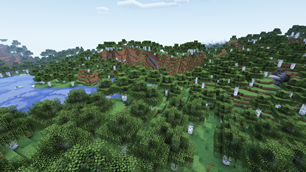
These settings make Complementary look a lot more like vanilla, and they also give it more gentle, comforting, and/or happy feel. I've literally spent countless hours tweaking these settings to be just the way I want them, and I haven't seen anything that looks as good as this (in my opinion, of course).
How to install:
1: Open your shaderpacks folder
1.1: Open Minecraft
1.2: Go to the shaders menu
1.3: Click 'Shaders Folder'
2: Make a copy of Complementary and add "_Vanilla" to the end of the name (this step is optional)
3: Copy the entire name of the shader file and paste it into the settings file (the one from this page)
For example, if the shader file is "Complementary_v4.2.1_Vanilla.zip", the settings file needs to be "Complementary_v4.2.1_Vanilla.zip.txt"
4: Move the settings file into the shaders folder.
FAQ
How do these setting impact performance compared to the default settings?
These settings are much less intensive than the default setting
What all is this compatible with?
These settings should work with any version of Complementary, both older versions and newer version. It won't work with anything other than Complementary, though, probably not even BSL or BSL edits. Also, These settings don't currently work with Iris since it doesn't support shader settings at all.
Can I use these settings in my modpack?
No, Complementary requires you to use default settings if you include it in your modpack.
How can I share these settings with others?
Please link them to this page.
Where can I send suggestions, questions, and/or problems?
You can contact me on discord at What42Pizza#0283.
Things you might want to change…
… to make it run better: (in order of what I'd turn off first)
1: Anti-Aliasing and Sharpening
Settings/Post-Process/Anti-aliasing: off, Settings/Post-Process/Image-Sharpening: 0
2: Water Reflections
Settings/Materials/Water-Translucent-Sky-Ref.: off
3: Shadows
Settings/Shadows/Real-Time-Shadows: off
4: Integrated PBR+
Settings/RP-Support: "Basic (PBR Disabled)"
5: SSAO (makes edges/corners of blocks darker)
Settings/Shadows/SSAO: off
… to make it look better: (in order of what I'd turn on first)
1: Light Shafts
Settings/World/Light-Shaft-Settings/Light-Shafts: on
2: Better water reflections
Settings/Materials/Water-Translucent-Reflections: on
3: Colored Shadows
Settings/Shadows/Colored-Shadows: on
4: Projected Caustics (caustics makes water wavy, projected caustics makes it wavy when looking into water (from the outside))
Settings/Water/Projected-Caustics: on
5: Atmospheric Fog (set (by this) to mostly affect rain)
Settings/World/Fog-Settings/Atmospheric-Fog: on
… to make it look better, and less like vanilla: (in order of what I'd turn on first)
1: Galaxies
Settings/Sky/Night-Sky-Settings/Galaxies: on
2: More Sun Rays
Settings/Light-Shaft-Settings/Light-Shaft-Strength
3: Bloom
Settings/Post-Process/Bloom-Settings/Bloom: on
4: Darken Shadows
Settings/Lighting/Overworld-Light-Colors: lower each Ambience/Intensity by 0.1 to 0.2
Add a comment