

 Get 0.05 TON 💎
Earlier Versions
| Name | Size | Uploaded | Game Version | Downloads | |
| WithoutAWallpaper-1.17.1-1.2.0.jar beta | 247.94 KB | Jul 25, 2021 | 1.17.1 | 0 |  Download Download |
| WithoutAWallpaper-1.16.5-1.2.0.jar beta | 246.11 KB | Jun 24, 2021 | 1.16.5 | 28 | Download |
| WithoutAWallpaper-1.16.5-1.1.0.jar beta | 227.35 KB | Feb 23, 2021 | 1.16.5 | 154 | Download |
| WithoutAWallpaper-1.16.4-1.0.0.jar beta | 215.78 KB | Jan 6, 2021 | 1.16.5 | 1,361 | Download |
| WithoutAWallpaper-1.15.2-0.1.1.jar beta | 30.03 KB | Nov 20, 2020 | 1.15.2 | 27 | Download |
| WithoutAWallpaper-1.16.4-0.1.1.jar beta | 30.03 KB | Nov 17, 2020 | 1.16.4 | 48 | Download |
| WithoutAWallpaper-1.16.4-0.1.0.jar beta | 30.02 KB | Nov 16, 2020 | 1.16.4 | 6 | Download |
Screenshots


Description

Current Features:
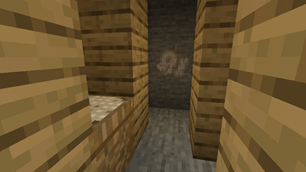
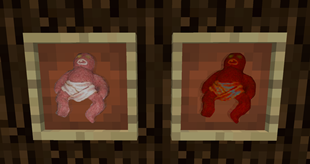
- two wallpaper designs with multiple colors
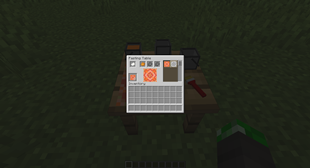
- Pasting Table where you can craft wallpapers with paper and one to three dyes
- possibility to add custom designs (see guide below)
Planned Features:
- more wallpaper designs
Adding custom designs:
- change "enableCustomDesigns" to true in the withoutawallpaper-server-config file
- add your custom design to "customDesigns" in the same file
- For example, if you want to add a design named "test" with two colors, where the first can be any color and the second can be blue or green, you need to add "test[all;blue,green]".
- each design must have an individual name
- each design can have one to three colors
Adding resources for custom designs:
- resources must be located in "<game folder>/config/withoutawallpaper/CustomWallpaperResources/" or in a resource pack
- for each design you have to create a folder with the name of the design in "assets/withoutawallpaper/textures/block/wallpaper/"
- create a "design.png" file and a "color0" folder, for more than one color additionally a "color1" folder and for more than two colors additionally a "color2" folder (the design.png image will be shown in the pasting table design selection)
- in each "color0" / "color1" / "color2" folder you have to create a "<colorname>.png" file for each available color (for example "blue.png" or "light_gray.png")
- if you have a wallpaper with lime as first color and black as second color, color0/lime.png and color1/black.png will be rendered on top of each other
Any ideas on what I can improve / add or have a better texture for something?
Let me know:


![PlatinumOreAndMore [POAM]](https://files.minecraftpatch.com/addons_new/platinumoreandmore-poam-450390/screenshots/platinumoreandmore-poam-scr-1-mini.png)
Add a comment