

 Get 0.05 TON 💎
Earlier Versions
| Name | Size | Uploaded | Game Version | Downloads | |
| tobymodxp-2.0.jar release | 42.77 KB | Mar 29, 2016 | 1.8.9 | 913 |  Download Download |
| Download v1.0 release | 16.36 KB | Nov 13, 2015 | 1.8 | 454 | Download |
Screenshots


Description
What it does?
This mod allows you and your friends to keep your hard-fought experience level save. To do this there are two ways:
When you installed this mod you will keep 100% of your level when you die. If you like, you can change that to any percentage or turn this feature completely off. (Look below in the FAQ section for more information.)
Then there is this awesome new machine, which allows you to bottle some level and store them for bad times.
How it works?
Simple – build the machine, place an empty glass bottle in it, press a button and you’ll have stored some level in it. You can drink it whenever you want to get the level in it back.
Is this mod multiplayer compatible?
Yep. As long as both – Client and Server – have installed it, this mod should run without a problem on your forge server.
How to install it?
1) Download and install Forge.(make sure you use 1.8.9)
2) Download this mod and place the .jar into your Mods Directory (.minecraft\mods).
FAQ
How to build the machine?
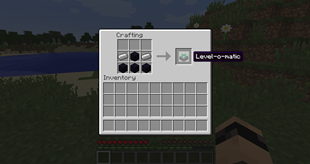
Like an enchantment table but without a book and iron ingots instead of diamonds. (Look at the pictures  )
)
Why do I need a certain amount of level to bottle my level?
Example: In Minecraft you need 7 XP-points to reach level 1. Now you bottle ten times one level when you reach level 1. So you invested 70 XP-points and saved 10 levels at all. But with 70 XP-points you should be just level 5, not 10. (http://minecraft.gamepedia.com/Experience for further information)
You see, leveling would be much faster without restrictions. (tbh; it’s still faster than normal but these restrictions keep it at least a bit under control. If you have any suggestions how to handle this, write it down in the comments, please.)
How to change the percentage of level you lose on death?
When you run forge with this mod at least once, a config file will be created (.minecraft\config).
Inside this folder is a file called tobymodxp.cfg. Open it with any text editor (I recommend Notepad++) and change the values. Save it and restart Minecraft.



Add a comment