


 Get 0.05 TON 💎
Earlier Versions
| Name | Size | Uploaded | Game Version | Downloads | |
| [FABRIC][1.19.1] Camera Utils 1.19.1-1.0.2 release | 88.47 KB | Jul 27, 2022 | 1.19.1 | 0 | ![download Camera Utils [FABRIC][1.19.1] Camera Utils 1.19.1-1.0.2 release](https://minecraftpatch.com/wp-content/themes/template/img/download.png) Download Download |
| [FABRIC][1.19] Camera Utils 1.19-1.0.2 release | 88.47 KB | Jul 21, 2022 | 1.19 | 845 | Download |
| [FABRIC][1.19] Camera Utils 1.19-1.0.1 release | 87.54 KB | Jul 20, 2022 | 1.19 | 228 | Download |
| [FABRIC][1.19] Camera Utils 1.19-1.0.0 beta | 87.54 KB | Jun 7, 2022 | 1.19 | 5,203 | Download |
| [FABRIC][1.18.2] Camera Utils 1.18.2-1.0.0 beta | 87.20 KB | Feb 28, 2022 | 1.18.2 | 7,643 | Download |
| [FABRIC][1.18.1] Camera Utils 1.18.1-1.0.0 beta | 87.19 KB | Dec 10, 2021 | 1.18.1 | 10,291 | Download |
| [FABRIC][1.17.1] Camera Utils 1.17.1-1.0.2 beta | 66.63 KB | Aug 2, 2021 | 1.17.1 | 8,171 | Download |
| [FABRIC][1.18.2] Camera Utils 1.18.2-1.0.1 alpha | 87.21 KB | Apr 10, 2022 | 1.18.2 | 2,294 | Download |
| [FABRIC][1.18.1] Camera Utils 1.18.1-1.0.1 alpha | 87.21 KB | Apr 10, 2022 | 1.18.1 | 1,016 | Download |
| [FABRIC][1.18] Camera Utils 1.18-1.0.0 alpha | 87.19 KB | Nov 30, 2021 | 1.18 | 2,463 | Download |
| [FABRIC][1.18-rc1] Camera Utils 1.18-rc1-1.0.0 alpha | 87.20 KB | Nov 26, 2021 | 1.18-Snapshot | 453 | Download |
| [FABRIC][1.18-pre2] Camera Utils 1.18-pre2-1.0.0 alpha | 87.20 KB | Nov 17, 2021 | 1.18-Snapshot | 82 | Download |
| [FABRIC][1.18-pre1] Camera Utils 1.18-pre1-1.0.0 alpha | 83.80 KB | Nov 12, 2021 | 1.18-Snapshot | 235 | Download |
| [FABRIC][1.17.1] Camera Utils 1.17.1-1.0.5 alpha | 84.23 KB | Sep 16, 2021 | 1.17.1 | 2,678 | Download |
| [FABRIC][1.17.1] Camera Utils 1.17.1-1.0.4 alpha | 79.28 KB | Sep 7, 2021 | 1.17.1 | 221 | Download |
| [FABRIC][1.17.1] Camera Utils 1.17.1-1.0.3 alpha | 75.48 KB | Aug 3, 2021 | 1.17.1 | 1,520 | Download |
| [FABRIC][1.17.1] Camera Utils 1.17.1-1.0.1 alpha | 66.56 KB | Aug 1, 2021 | 1.17.1 | 122 | Download |
Description


Camera Utils is a client side Fabric mod that adds convenient features related to the players camera.
Features
- Dynamic zoom
- Camera detaching
- Adjustable third person distance
- Two customizable third person perspectives
- Advanced cinematic camera controls
- Movement smoothing
Dynamic Zoom
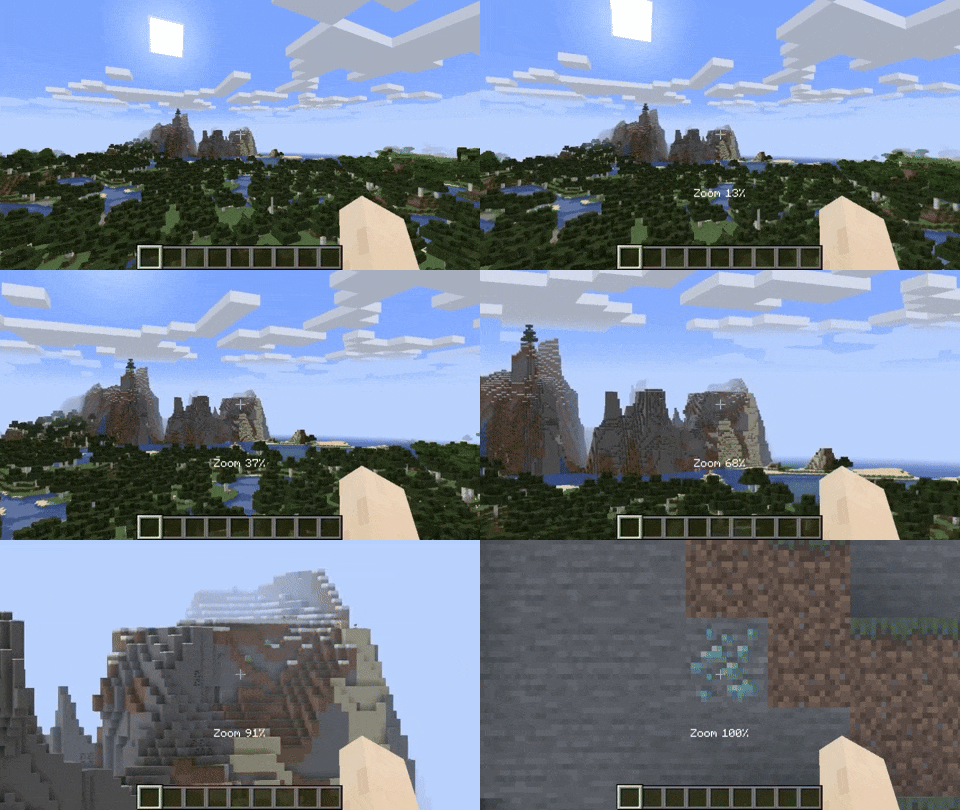
By default the zoom key is bound to Z. Holding the zoom key and scrolling dynamically adjusts the zoom value.
Camera Detaching
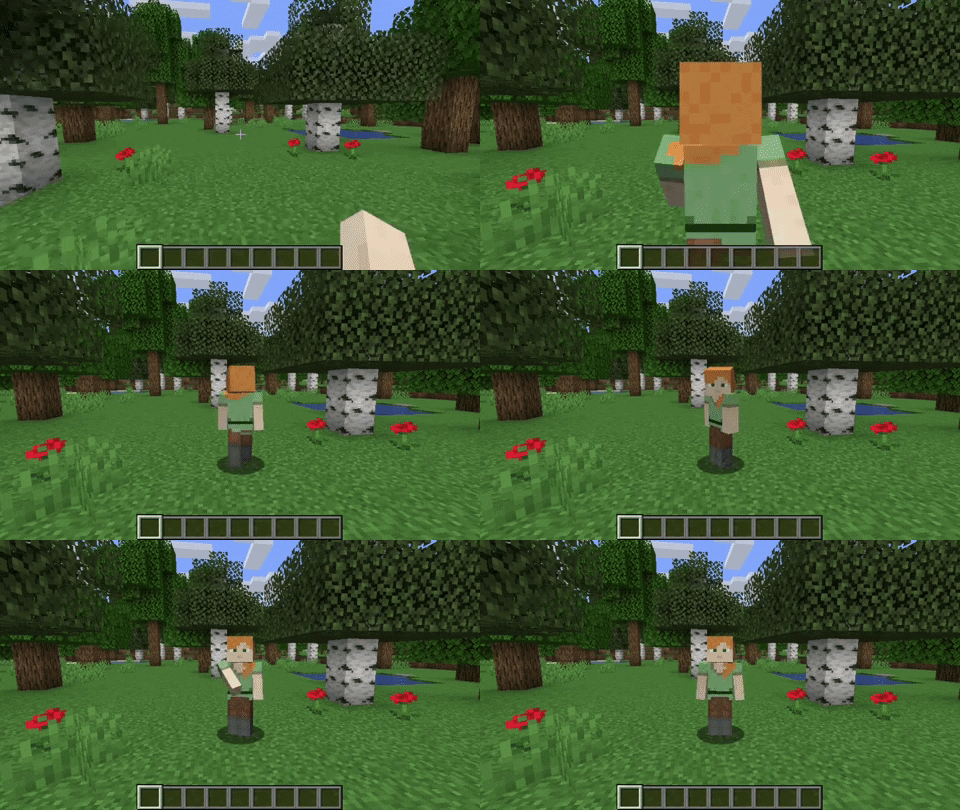
By hitting the detach camera button, the players camera is locked to the current position. You can still control the player like before, just from another point of view. By pressing RIGHT ALT in combination with the detach camera key, the camera goes back to the position, the camera was last detached.
Adjustable Third Person Distance
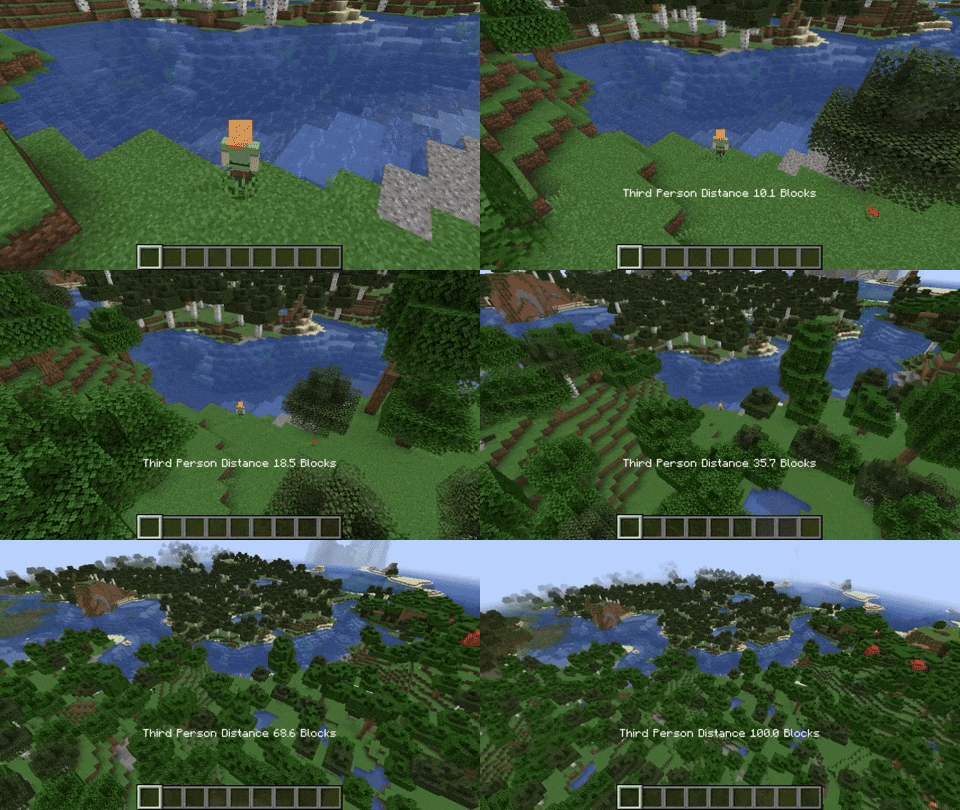
When holding the third person distance modifier in third person, you are able to scroll out up to 100 blocks away from the player.
Customizable Third Person Perspectives
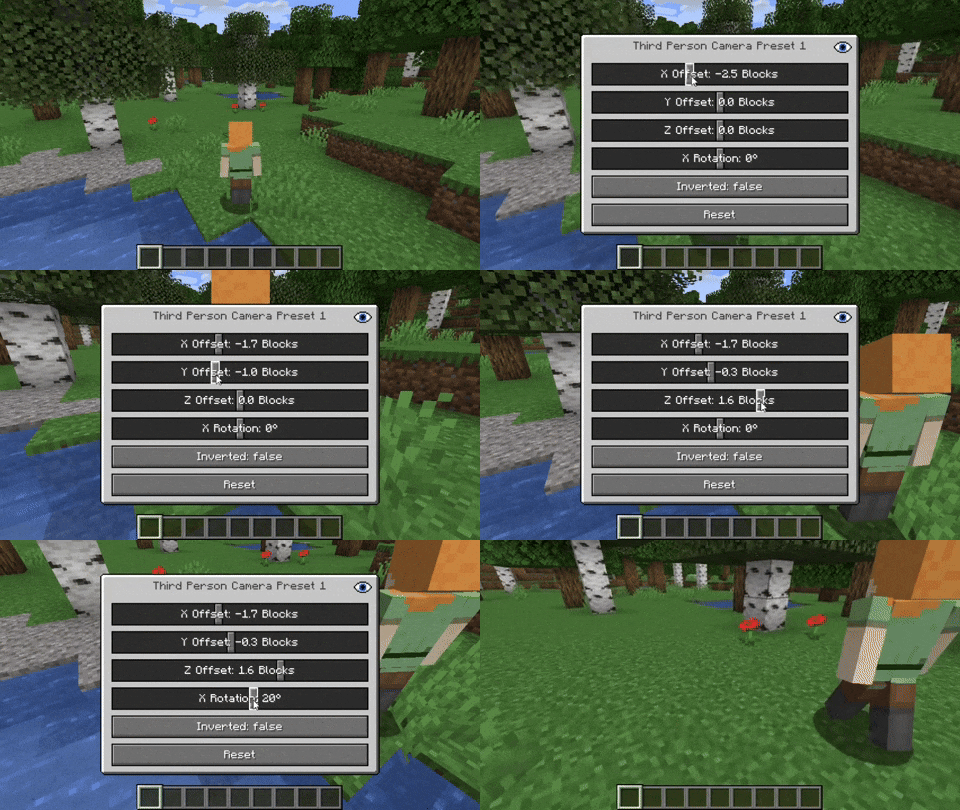
This mod allows for two custom third person perspectives. These are bound to F6 and F7 by default. These can be modified by pressing RIGHT ALT and F6 or F7 respectively.
Advanced Cinematic Camera Controls
By pressing RIGHT ALT and the cinematic camera button, you can adjust the properties of the cinematic camera.
Movement Smoothing
This option is located in the accessibility settings. It smoothens the players camera movement to potentially avoid motion sickness.
Additional Information
Pressing any key related to the camera utils mod in combination with RIGHT ALT will open a settings GUI which allows you to change properties or to reset them back to their default values.
Note that this mod is not compatible with OptiFine.
Add a comment