


 Get 0.05 TON 💎
Earlier Versions
| Name | Size | Uploaded | Game Version | Downloads | |
| Connected_Reinforced_Glass_Textures(1.18.2).zip release | 59.97 KB | Mar 19, 2022 | 1.18.2 | 0 |  Download Download |
| Connected_Reinforced_Glass_Textures(1.12.2).zip release | 72.87 KB | May 10, 2021 | 1.12.2 | 189 | Download |
| Connected_Reinforced_Glass_Textures(1.16.2).zip release | 57.08 KB | Aug 16, 2020 | 1.16.5 | 408 | Download |
| Connected_Reinforced_Glass_Textures(1.16.1).zip release | 57.04 KB | Jul 30, 2020 | 1.16.1 | 49 | Download |
| Connected_Reinforced_Glass_Textures(1.15.2).zip release | 61.49 KB | May 29, 2020 | 1.15.2 | 68 | Download |
| Connected_Reinforced_Glass_Textures(1.14.4).zip release | 57.03 KB | May 29, 2020 | 1.14 | 32 | Download |
Description
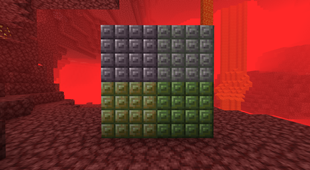
This Resource Pack connects the Reinforced Glass (pane) textures to each other, using the OptiFine CTM feature. The pack has been updated to 1.15.2 and 1.16.1, however Optifine 1.15.2 and 1.16.1 is currently in preview, so it is possible to encounter (minor) bugs with this Resource Pack.
How to use it:
1) Download the texture pack for your minecraft version
2) Make sure that you've installed both OptiFine and SecurityCraft with the right minecraft versions into the mod folder
3) Put the texture pack into the "resourcepack" folder of Minecraft
4) Have fun with your huge reinforced windows that look much better now!
If you have any questions/issues, please use the comment section below.
Add a comment