

 Get 0.05 TON 💎
Earlier Versions
| Name | Size | Uploaded | Game Version | Downloads | |
| CptLock 1.5.0 release | 18.04 KB | Apr 26, 2014 | 1.7.4 | 1,106 |  Download Download |
| CptLock 1.4.3 release | 12.89 KB | Apr 23, 2014 | 1.7.4 | 400 | Download |
Screenshots

Description
CptLock is the new chest locking plugin! (Also: Doors, furnaces, enderchests, trapdoors, hoppers, beacons, droppers, dispensers etc.
The plugin comes with permissions and help commands! It even comes with the function for admins to override the protections and show them a message when they do so!
Permissions:
cptlock.* - This will give permission to use all CptLock functions.
cptlock.admin.* - This will give access to use all admin functions.
cptlock.admin.override - This will give permission to override all locks.
cptlock.admin.ccl - This will give permission to create custom locks.
cptlock.user.* - This will give access to use all user functions.
cptlock.user.createlock - This will give permission to create CptLocks.
Added in 1.5.0:
cptlock.user.creategroup - Gives permission to create access groups.
Lock Creation:
1. Simply place a sign on the object you want to lock and put [CL] on the first line.
2. Put the name of two other people you want to interact with the object on the third and fourth line.
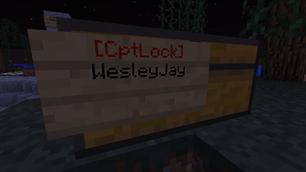
3. You're done! The first line should now automatically change to [CptLock] in red and the second line should now read your name. It's as easy as that! The object will now be protected from anything ranging from opening it to destruction by TNT and creepers!
(Admins)Custom Lock Creation:
Admins can create 'custom' locks, these locks wont change the second line to their own name, allowing them to create locks for other people.
1. Place a sign on an object and write [CCL] on the first line.
2. Write the names of the people that may interact with this object on the second, third and fourth line.
3. Right click the sign with a wooden hoe.
4. You're done! The first line should now automatically change to [CptLock] in red.
Commands:
/cptlock ?/help – Shows a help screen.
/cptlock info – Shows basic plugin info.
/cptlock guide/tutorial – Shows a guide list for guides on CptLocks.
/cptlock guide/tutorial locks – Shows the general information of CptLocks.
/cptlock guide/tutorial creation – Shows a guide on creating CptLocks.
Added in 1.5.0:
/cptlock guide/tutorial groups – SHows a guide on creating CptLocks.
/cptlock groups new <groupname> – Create an access group.
/cptlock groups add <groupname> <player> – Add a player to an access group.
/cptlock groups remove <groupname> <player> – Remove a player to an access group.
/cptlock groups promote <groupname> <player> – Make a member a co-owner of an access group.
/cptlock groups demote <groupname> <player> – Make a co-owner a member again.
/cptlock groups <groupname> – Get member list of a group.




Add a comment