

![minecraft mod [DiscordLogs] Remasterd ( Ingame Support )](https://files.minecraftpatch.com/addons_new/discordlogs-remasterd-ingame-support-568664/screenshots/discordlogs-remasterd-ingame-support-scr-1-mini.png)
 Get 0.05 TON 💎
Earlier Versions
| Name | Size | Uploaded | Game Version | Downloads | |
| [DiscordLogs] Update 3.2 release | 78.81 KB | Feb 25, 2022 | 1.18.1 | 5 | ![download [DiscordLogs] Remasterd ( Ingame Support ) [DiscordLogs] Update 3.2 release](https://minecraftpatch.com/wp-content/themes/template/img/download.png) Download Download |
| [DiscordLogs] Update 3.1 release | 75.31 KB | Feb 24, 2022 | 1.18.1 | 2 | Download |
| [DiscordLogs] Update 3.0 release | 71.53 KB | Feb 23, 2022 | 1.18.1 | 20 | Download |
| [DiscordLogs] Update 2.9 release | 69.38 KB | Feb 23, 2022 | 1.18.1 | 7 | Download |
| [DiscordLogs] Update 2.8 release | 70.03 KB | Feb 21, 2022 | 1.18.1 | 7 | Download |
| [DiscordLogs] Update 2.6 release | 61.48 KB | Feb 16, 2022 | 1.18.1 | 44 | Download |
| [DiscordLogs] Update 2.4 release | 55.00 KB | Feb 3, 2022 | 1.18.1 | 54 | Download |
| [DiscordLogs] Update 2.7 (Alpha a1) alpha | 68.41 KB | Feb 18, 2022 | 1.18.1 | 13 | Download |
| [DiscordLogs] Update 2.5 alpha | 61.43 KB | Feb 7, 2022 | 1.18.1 | 21 | Download |
| [DiscordLogs] Update 2.3 alpha | 48.57 KB | Jan 27, 2022 | 1.18.1 | 16 | Download |
Screenshots
![[DiscordLogs] Remasterd ( Ingame Support )](https://files.minecraftpatch.com/addons_new/discordlogs-remasterd-ingame-support-568664/screenshots/discordlogs-remasterd-ingame-support-scr-1.png)
![[DiscordLogs] Remasterd ( Ingame Support )](https://files.minecraftpatch.com/addons_new/discordlogs-remasterd-ingame-support-568664/screenshots/discordlogs-remasterd-ingame-support-scr-2.png)
Description
Discord Logs:
Total Lines of Code: 2923
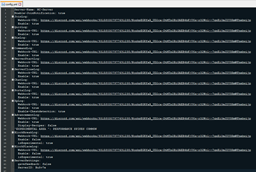
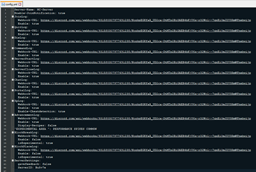
You can configurate a lot in the Config.yml.
You can select induvidually webhooks for every log, also you can select a Custom color!
Please report bugs or send Suggestions via /Feedback ( Message ) ingame.
Note: the Java panel opens on the host computer, Not at the clients.
Infos about your Server is getting send for Development reasons to the Developer, if you dont want this write “false” in the config.yml at “Sendserverinfo:”
Enter Your Discord Tag at  to get a better experience and better Support!
If you need help or Support open a Ticket at my Discord!
https://discord.gg/EvT277qaZx
Commands:
/discordlogs info = show config status
/discordlogs serverid = shows serverid
/feedback (message) = send feedback
/editconfig (logtype) (true/false) = Toggle logs ingame
/editconfig (logtype) color (color(blue,green ….)) = changes color
/editconfig imagetop (ImageURL) = set Top Embed thumbnail
/editconfig imagedown (ImageURL) set Bottom Embed thumbnail
/keyword list = lists all keywords
/keyword add (keyword) = add a Keyword
/keyword remove (keyword) = remove a Keyword
/keyword list clear = Clears the Keyword list
/keyword roleid (roleid) = changes the discord role
/invgui = opens Inventory GUI
/sendtodiscord = send costum message to chat channel
/support (I Need support for the config) (yourdiscordtag#0123)
Permissions:
discordlogs.info = use /discordlogs info
discordlogs.serverid = use /discordlogs serverid
discordlogs.feedback = use /feedback (message)
discordlogs.joinnote = get join config status
discordlogs.ingame.addkeyword = use /keyword add (keyword) command
discordlogs.ingame.config = use /editconfig colorlist, use /editconfig list
discordlogs.ingame.removekeyword = use /keyword remove (keyword)
discordlogs.ingame.roleid = /keyword roleid (roleid)
discordlogs.ingame.list.clear = use /keyword list clear
discordlogs.ingame.list.view = use /keyword list
discordlogs.ingame.config.help = use /editconfig help
discordlogs.ingame.invgui = use /invgui
discordlogs.ingame.sendmessage = use /sendtodiscord
discordlogs.use = use /discordlogs
discordlogs.support = use /support
How to use?
1. drag the “discordlogs.jar” in the Plugins folder
2. Start the Server
3. go in plugins/discordlogs/config.yml
4. Type at
Enable: true or false to toggle the log
5. paste ur own Webhook-URL at
Webhook-URL: www.discordwebhook.com
6. Type /discordlogs rl/reload
7. Done
Update Logs:




Add a comment