

![minecraft mod Entity Texture Features – [Fabric]](https://files.minecraftpatch.com/addons_new/entity-texture-features-fabric-568563/screenshots/entity-texture-features-fabric-scr-1-mini.png)
 Get 0.05 TON 💎
Earlier Versions
| Name | Size | Uploaded | Game Version | Downloads | |
| [Fabric] Entity Texture Features [V3.1.0]-[1.19] release | 1.11 MB | Jun 8, 2022 | 1.19 | 6 | ![download Entity Texture Features – [Fabric] [Fabric] Entity Texture Features [V3.1.0]-[1.19] release](https://minecraftpatch.com/wp-content/themes/template/img/download.png) Download Download |
| [Fabric] Entity Texture Features [V3.0.4]-[1.18.x] release | 1.11 MB | Jun 2, 2022 | 1.18.2 | 4,433 | Download |
| Entity Texture Features [V3.0.3]-[1.18.x] release | 1.11 MB | Jun 1, 2022 | 1.18.2 | 658 | Download |
| Entity Texture Features [V3.0.2]-[1.18.x] release | 1.11 MB | May 30, 2022 | 1.18.2 | 949 | Download |
| Entity Texture Features [V3.0.1]-[1.18.x] release | 1.11 MB | May 28, 2022 | 1.18.2 | 5,831 | Download |
| Entity Texture Features [V3.0.0]-[1.18.x] release | 1.11 MB | May 26, 2022 | 1.18.2 | 3,588 | Download |
| Entity Texture Features [V2.6.0]-[1.18+] release | 1.07 MB | Mar 29, 2022 | 1.18.2 | 59,582 | Download |
| Entity Texture Features [V2.5.6]-[1.18.x] release | 974.14 KB | Mar 18, 2022 | 1.18.2 | 2,690 | Download |
| Entity Texture Features [V2.4.5]-[1.18.2] release | 953.93 KB | Mar 10, 2022 | 1.18.2 | 2,247 | Download |
| Entity Texture Features [V2.4.5]-[1.18.0-1] release | 1.03 MB | Mar 10, 2022 | 1.18.1 | 1,282 | Download |
| Entity Texture Features [V2.4.4]-[1.18.2] release | 953.60 KB | Mar 10, 2022 | 1.18.2 | 102 | Download |
| Entity Texture Features [V2.4.4]-[1.18.0-1] release | 1.03 MB | Mar 10, 2022 | 1.18.1 | 186 | Download |
| Entity Texture Features [V2.4.3]-[1.18.2] release | 952.53 KB | Mar 9, 2022 | 1.18.2 | 140 | Download |
| Entity Texture Features [V2.4.3]-[1.18.0-1] release | 1.03 MB | Mar 9, 2022 | 1.18.1 | 128 | Download |
| Entity Texture Features [V2.4.2]-[1.18.2] release | 952.60 KB | Mar 9, 2022 | 1.18.2 | 60 | Download |
| Entity Texture Features [V2.4.2]-[1.18.0-1] release | 1.03 MB | Mar 9, 2022 | 1.18.1 | 62 | Download |
| Entity Texture Features [V2.4.1]-[1.18.2] release | 950.67 KB | Mar 8, 2022 | 1.18.2 | 1,161 | Download |
| Entity Texture Features [V2.4.1]-[1.18.1] release | 1.03 MB | Mar 8, 2022 | 1.18.1 | 3,409 | Download |
| Entity Texture Features [V2.4.1]-[1.18.0] release | 1.03 MB | Mar 8, 2022 | 1.18 | 14 | Download |
| Entity Texture Features [V2.4.0]-[1.18.2] release | 950.38 KB | Mar 8, 2022 | 1.18.2 | 41 | Download |
| Entity Texture Features [V2.4.0]-[1.18.1] release | 1.03 MB | Mar 8, 2022 | 1.18.1 | 51 | Download |
| Entity Texture Features [V2.4.0]-[1.18.0] release | 1.03 MB | Mar 8, 2022 | 1.18 | 19 | Download |
| Entity Texture Features [V2.3.6]-[1.18.1] release | 1.02 MB | Mar 7, 2022 | 1.18.1 | 260 | Download |
| Entity Texture Features [V2.3.6]-[1.18.2] release | 945.48 KB | Mar 7, 2022 | 1.18.2 | 428 | Download |
| Entity Texture Features [V2.3.5]-[1.18.1] release | 942.47 KB | Mar 6, 2022 | 1.18.1 | 174 | Download |
| Entity Texture Features [V2.3.5]-[1.18.2] release | 945.19 KB | Mar 6, 2022 | 1.18.2 | 217 | Download |
| Entity Texture Features [V2.3.4]-[1.18.2] release | 945.17 KB | Mar 5, 2022 | 1.18.2 | 1,169 | Download |
| Entity Texture Features [V2.3.3]-[1.18.2] release | 986.05 KB | Mar 5, 2022 | 1.18.2 | 99 | Download |
| Entity Texture Features [V2.3.2]-[1.18.2] release | 989.63 KB | Mar 4, 2022 | 1.18.2 | 1,753 | Download |
| Entity Texture Features [V2.3.1]-[1.18.2] release | 989.11 KB | Mar 4, 2022 | 1.18.2 | 31 | Download |
| Entity Texture Features [V2.3.0]-[1.18.2] release | 989.03 KB | Mar 4, 2022 | 1.18.2 | 30 | Download |
| Entity Texture Features [V2.2.0]-[1.18.1] release | 969.14 KB | Feb 20, 2022 | 1.18.1 | 13,212 | Download |
| [Forge] Entity Texture Features [V3.0.4]-[1.18.2] beta | 182.33 KB | Jun 3, 2022 | 1.18.2 | 53 | Download |
| Entity Texture Features [V2.3.6]-[1.16.5-Backport] alpha | 1,022.41 KB | Mar 7, 2022 | 1.16.5 | 224 | Download |
| Entity Texture Features [V2.3.6]-[1.17.1-Backport] alpha | 1.00 MB | Mar 7, 2022 | 1.17.1 | 292 | Download |
| Entity Texture Features [V2.3.5]-[1.16.5-Backport] alpha | 1,022.21 KB | Mar 6, 2022 | 1.16.5 | 15 | Download |
| Entity Texture Features [V2.3.5]-[1.17.1-Backport] alpha | 1.00 MB | Mar 6, 2022 | 1.17.1 | 28 | Download |
Screenshots
![Entity Texture Features – [Fabric]](https://files.minecraftpatch.com/addons_new/entity-texture-features-fabric-568563/screenshots/entity-texture-features-fabric-scr-1.png)
![Entity Texture Features – [Fabric]](https://files.minecraftpatch.com/addons_new/entity-texture-features-fabric-568563/screenshots/entity-texture-features-fabric-scr-2.png)
![Entity Texture Features – [Fabric]](https://files.minecraftpatch.com/addons_new/entity-texture-features-fabric-568563/screenshots/entity-texture-features-fabric-scr-3.png)
![Entity Texture Features – [Fabric]](https://files.minecraftpatch.com/addons_new/entity-texture-features-fabric-568563/screenshots/entity-texture-features-fabric-scr-4.png)
![Entity Texture Features – [Fabric]](https://files.minecraftpatch.com/addons_new/entity-texture-features-fabric-568563/screenshots/entity-texture-features-fabric-scr-5.png)
![Entity Texture Features – [Fabric]](https://files.minecraftpatch.com/addons_new/entity-texture-features-fabric-568563/screenshots/entity-texture-features-fabric-scr-6.png)
![Entity Texture Features – [Fabric]](https://files.minecraftpatch.com/addons_new/entity-texture-features-fabric-568563/screenshots/entity-texture-features-fabric-scr-7.png)
![Entity Texture Features – [Fabric]](https://files.minecraftpatch.com/addons_new/entity-texture-features-fabric-568563/screenshots/entity-texture-features-fabric-scr-8.png)
![Entity Texture Features – [Fabric]](https://files.minecraftpatch.com/addons_new/entity-texture-features-fabric-568563/screenshots/entity-texture-features-fabric-scr-9.png)
![Entity Texture Features – [Fabric]](https://files.minecraftpatch.com/addons_new/entity-texture-features-fabric-568563/screenshots/entity-texture-features-fabric-scr-10.png)
![Entity Texture Features – [Fabric]](https://files.minecraftpatch.com/addons_new/entity-texture-features-fabric-568563/screenshots/entity-texture-features-fabric-scr-11.png)
![Entity Texture Features – [Fabric]](https://files.minecraftpatch.com/addons_new/entity-texture-features-fabric-568563/screenshots/entity-texture-features-fabric-scr-12.png)
![Entity Texture Features – [Fabric]](https://files.minecraftpatch.com/addons_new/entity-texture-features-fabric-568563/screenshots/entity-texture-features-fabric-scr-13.png)
![Entity Texture Features – [Fabric]](https://files.minecraftpatch.com/addons_new/entity-texture-features-fabric-568563/screenshots/entity-texture-features-fabric-scr-14.png)
![Entity Texture Features – [Fabric]](https://files.minecraftpatch.com/addons_new/entity-texture-features-fabric-568563/screenshots/entity-texture-features-fabric-scr-15.png)
![Entity Texture Features – [Fabric]](https://files.minecraftpatch.com/addons_new/entity-texture-features-fabric-568563/screenshots/entity-texture-features-fabric-scr-16.png)
![Entity Texture Features – [Fabric]](https://files.minecraftpatch.com/addons_new/entity-texture-features-fabric-568563/screenshots/entity-texture-features-fabric-scr-17.png)
![Entity Texture Features – [Fabric]](https://files.minecraftpatch.com/addons_new/entity-texture-features-fabric-568563/screenshots/entity-texture-features-fabric-scr-18.png)
![Entity Texture Features – [Fabric]](https://files.minecraftpatch.com/addons_new/entity-texture-features-fabric-568563/screenshots/entity-texture-features-fabric-scr-19.png)
![Entity Texture Features – [Fabric]](https://files.minecraftpatch.com/addons_new/entity-texture-features-fabric-568563/screenshots/entity-texture-features-fabric-scr-20.png)
Description

Including random, emissive textures for Mobs, Skins and others
mostly using the Optifine Format but compatible with Sodium 🙂
~ Now with 1.16.5 -> 1.18.2
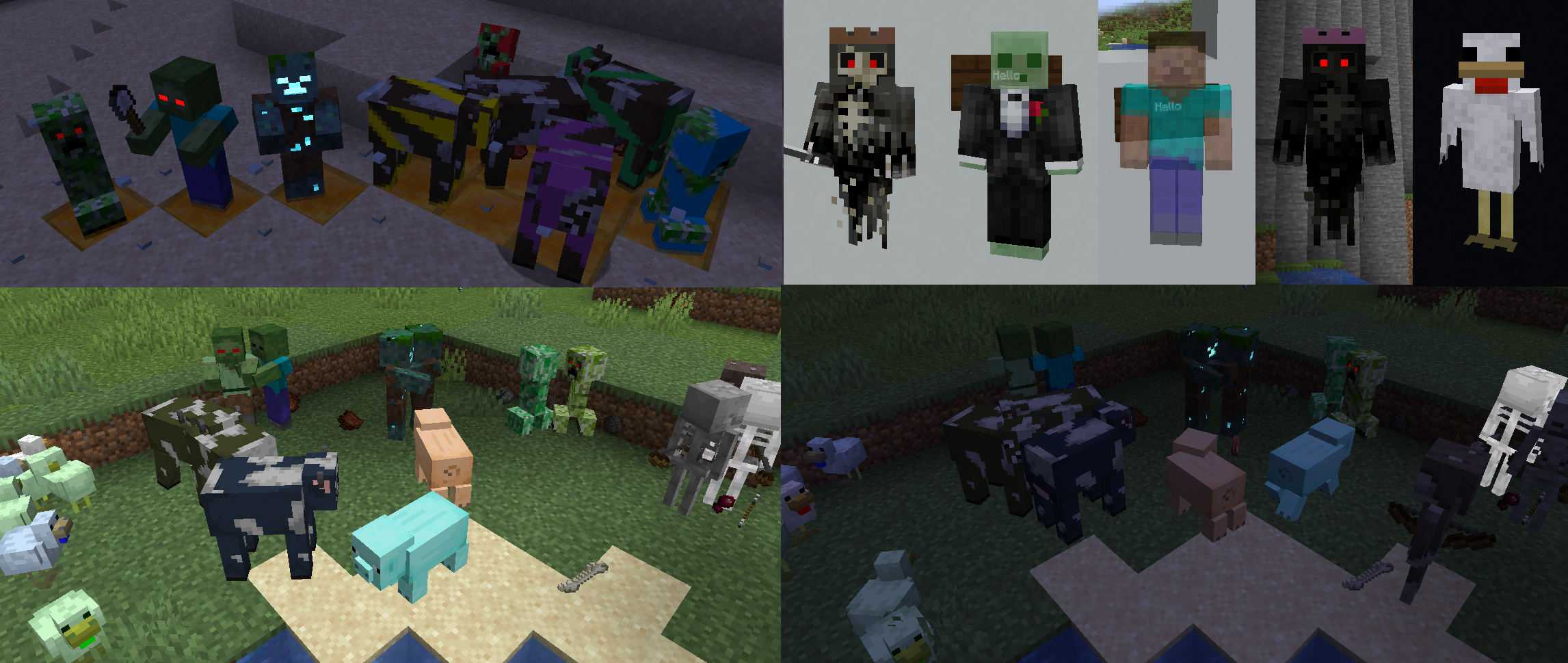
What does this mod do? ????
This Client-side mod adds support for a bunch of entity texture features that can be set in compatible Resourcepacks or Player skins.
The features of this mod include:
- ???? Custom & Random entity textures just like Optifine & compatible with Optifine Resourcepacks. (Customised by mob Name, Biome, etc like Optifine)
- ???? Emissive/Glowing entity textures just like Optifine & compatible with Optifine Resourcepacks.
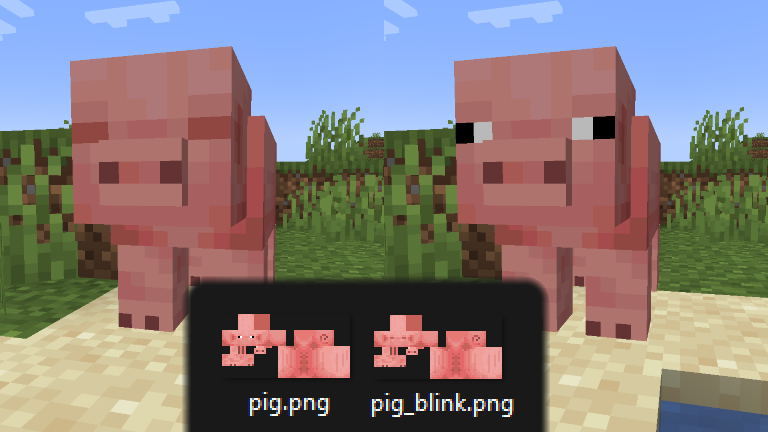
- ????️ Blinking mobs
- ???? Custom Trident textures
- ⚗️ Alternate potion visuals for mobs
- ???? Player skin support for most of these features
This mod is one of the alternatives for Optifine on Fabric, you can find more Fabric Optifine alternatives [here]
Everything can be enabled or disabled in the config or Mod Menu settings
Compatability
- ✅ALL! Optifine Random / Custom or Emissive Entity resourcepacks
- ✅@Motschen’s Puzzle Mod is fully compatible (just make sure to disable Puzzle’s emissive texture in it’s settings)
- ????Custom Entity Models (CEM) (will not crash but rarely applies correctly)
- ✅Sodium
- ✅Mod Menu & Clothconfig – optional
- ✅Iris Shaders (Support varies depending on the shader)
- ✅Mod added entities (only if the mod creator used the vanilla rendering code to render their mobs)
How to / Guide for resourcepack creators
For emissive & random entity textures to work you must have a resourcepack thats supports the Optifine format for random entity textures.
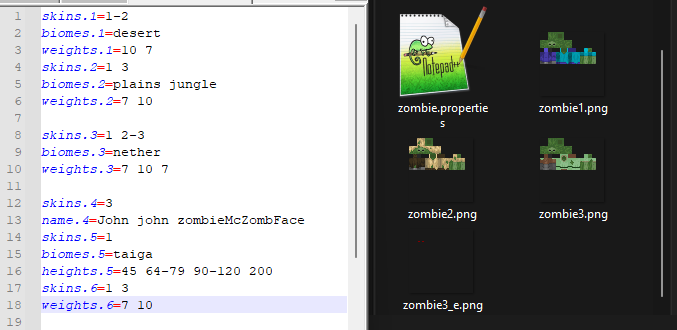
Emissive Textures:
- Emissive textures must be in the same folder as the texture it is glowing over and must be named like (TextureName#.png)
(with “#” being the suffix set by the topmost optifine format resourcepack, it will otherwise default to “_e” meaning the file name should be (TextureName_e.png)
- The example image above adds red glowing eyes for the texture “zombie3.png”
- Emissives are applied after randomised textures so they must contain the same number system as the random files they apply too
(e.g “zombie_e.png” will not apply to “zombie3.png” but “zombie3_e.png” will)
- Elytra & Tridents support emissive textures as of [V2.3.0]
- player skin features support emissive textures, see player skin features below…
Random / Custom Textures:
This mod is completely optifine format compatible!!!!
- Random textures are applied to each mob on the client-side
(based on it’s UUID, meaning that mob will always have the same random texture unless texture packs are changed, this will even be the same between players if they have the same packs.)
- Random textures must either be in the same folder as the vanilla texture or one of the optifine format folders such as “optifine/random/entity” or “optifine/mob”, and must be named like (TextureName#.png with # being any number ideally starting from either 1 or 2, (if 1.png does not exist it will use the vanilla texture, the vanilla texture can also be manually called by using the number 0)
- A “TextureName.properties” file can be placed alongside these random textures to determine special cases for different random textures to be selected, this properties file must support the optifine format and if one isn’t present the game will instead pick randomly from the available random textures present.
- This mod supports ALL the settings that may be used in the properties file.
- The properties files functions just as it does with optifine and if a specific entity does not match any of the conditions in the properties file it will default to the vanilla texture.
- The example image above shows that any zombie in a desert will have a 10/17 chance of using “zombie1.png”
it also shows that any zombie not in a (desert,plains,jungle,nether) biome and is named “John” will always use texture “zombie3.png”
it also shows that any zombie in a taiga biome, without the above names from the previoues category, and standing at y-level 45 will be texture “zombie1.png”
- “zombie3.png” also has an emissive texture “zombie3_e.png”, that will make it’s eyes glow red
- Certain conditions in the properties file will update the mobs texture when changed, these are (“name”, “profession”, “collarColors”, “baby”, “health”).
The other conditions such as “biomes” will only apply on first spawn / load.
(If they do not update (e.g baby doesn’t grow into adult texture) you can force a refresh on a mob by right clicking it or reloading the game/resourcepacks)
- Entities with multiple textures like Wolves should have the same amount of ranom variant textures for each texture variant
- Tridents support custom textures, as of [V2.3.0], a trident item named “Bobby’s Trident” will use the texture “trident_bobbys_trident.png”
Blinking feature
(This feature is the building blocks that I will be implimenting Optifine format animation from later)
- Mobs will blink periodically if they have a texture named “TEXTURE_blink.png”
- optionally you can also use a texture named TEXTURE_blink2.png” with the eyes half closed to have a smoother animation for large eyes like creepers
- blinking frequency can be alterred in settings
- Sleeping mobs will have their eyes closed if possible
- Mobs with the Blindness potion effect will have either their eyes closed or half closed depending on what is available
- player skins can support blinking, see player skin features below…
Tridents
- Tridents support custom and emissive textures, as of [V2.3.0], a trident item named “Bobby’s Trident” will use the texture “trident_bobbys_trident.png”
- option to disable it as CIT resewn mod may impliment in future, and this is only a quick implimentation

Alternate potion effects
- A setting in the config/mod menu settings, allows you to make it so mobs with potions effects can Glow, Appear enchanted, or have creeper charge fields around them
- mostly inspired by enchatned mobs in Minecraft Dungeons
Player skin features [V2.3.0+]
- Player skins can use emissive, blinking, enchanted, and transparency texture features.
- 100% optional, controlled by the skin file you upload to Mojang, and options to prevent abuse of features in PVP
First some examples of what you can do
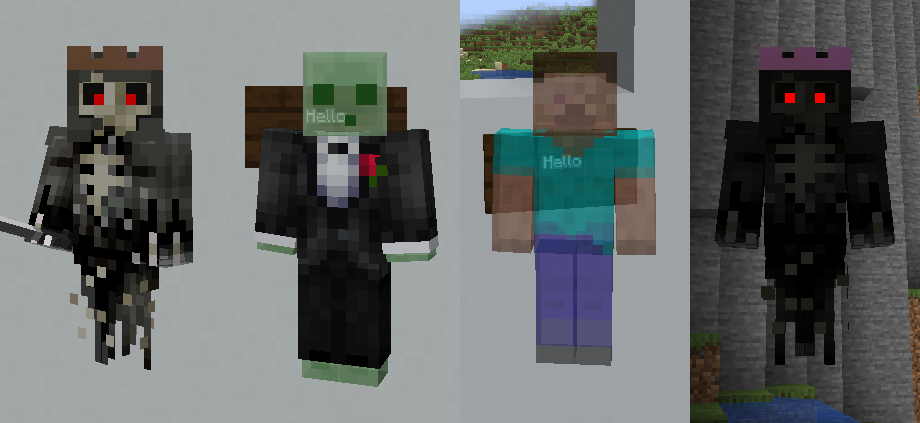
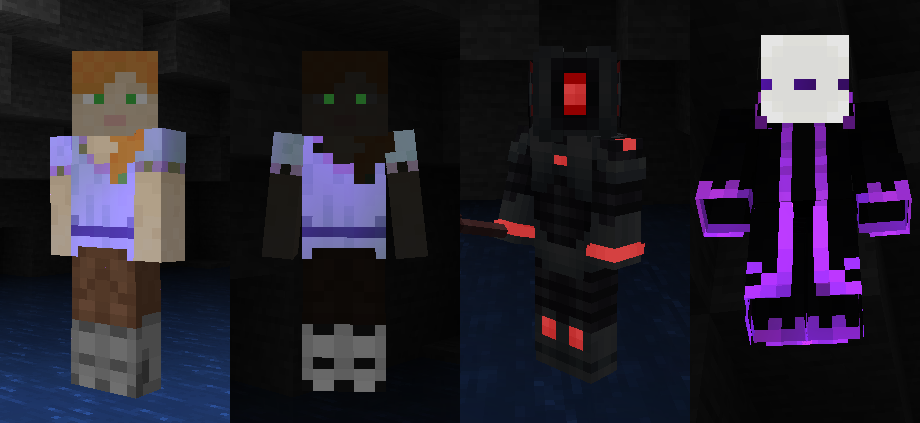
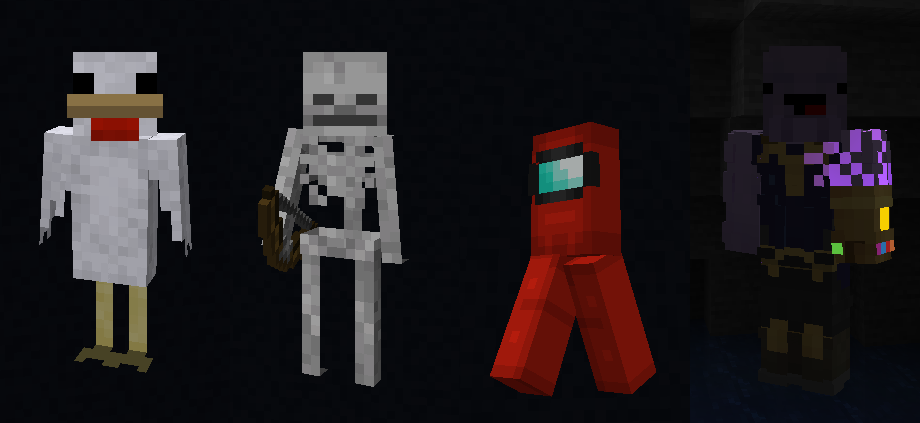
all of these examples are downloadable [HERE]
How can you do this?
- First of all to enable the skin features in this mod you must put the marker in your skin file,
this is the mess of colour pixels just below the head texture in the example image below.
- This mod will ignore any skin without this so noone else can affect YOUR skin
Transparency
- If the marker is present in your skin, you will then be able to use transparency in
the head, body,RLeg, LLeg,RArm, and LArm, body parts (this is disabled in vanilla).
- the total skin can not be less than 40% average transparency to prevent possible PVP abuse
an option may be added to ovverride this for fun in future
- See examples above in the Ghost, Slime, Steve, Chicken, Skeleton, and Among us skins
- can be seperately Disabled for enemy team players so as to not be abused in PVP settings
Emissiveness
- If the marker is present in your skin, you will then be able to use emissiveness in your skin
- any pixels present in the Red square with Black borders to the right of the right arm will be matched against
the rest of the skin, and any matching pixels of the exact same colour & opacity will glow
- See examples above in the Ghost, Robot, and Thanos’s gauntlet
Enchanting
- If the marker is present in your skin, you will then be able to use enchanting visuals in your skin
- any pixels present in the bright green square with Black borders to the right of the right arm will be matched against
the rest of the skin, and any matching pixels of the exact same colour & opacity will appear enchanted on your skin
- See examples above in the Alex, robed figure, and Thano’s arm skins
Blinking
- If the marker is present in your skin, you will then be able to have your skin blink periodically
But you must also choose what kind of blinking, many skins have large eyes, so to smooth out blinking you can have either
1 frame of blinking (eye open & eye closed) or 2 frames (eye open & eye half closed & eye closed)
to select one you must change the colour of the single Black pixel above the right arm and below the head 2 textures in the example below
to Select 1 frame you must use exactly the Pink pixel from the middle of the marker, for 2 frames use the Light Blue pixel in the middle of the marker
if neither of these are used the skin will not blink
- once this is done you can now add blinking textures to your skin, make a copy of the front of your face and put it in the purple box with a black outline
make this face have it’s eyes completely closed
- repeat with the extra head layer for your face and put that in the purple box with the black outline and diagonal line, just incase you have popout eyes
- if you have selected a 2 frame blink repeat this process with the the dark green boxes with black borders except this time make the eyes half closed
- In the example skins download pack you can see these on the Chicken & Slime Tuxedo

[downloadable and usable version below]
Settings
- Settings can be changed in-game with Mod Menu, or the config file can be found at config/entity_texture_features.json

Mod Support
- This mod should be compatible with any Mod added entities as long as they extend LivingEntityRenderer.class for rendering and utilise it correctly
- Settings can be altered ingame with Mod Menu
- fully supports iris but can vary between shaders
- fully sodium compatible
Optimization
- I have done my best to optimise the mod (much improved from its beginings with amazing help from @Motschen from Puzzle Mod back when this only had emissive support)
- It is fully compatible with sodium and has a negligible performance impact on my system
- you may see a few lagged frames when first loading with very large resourcepacks with hundres of random textures, but this will be a one time lag the first time that particular texture is called
- if you get excessive lag on large servers like Hypixel, then disable player skin features.
Known Bugs
- Please check any issue is not actually a problem in the properties file, a few packs seem to be pointing to textures that don’t exist and never notices because optifine just ignores these errors.
(I am still considering ignoring these situation aswell just to be compatible, but I would prefer to let the resourcepack creators know their preoperties file may not be working how they think)
- So far all Mob Entities support Random & Emissive textures though there may still be some quirks, if you find bugs you can message here or reach me on discord Traben#5687
- Complimentary shaders has it’s own emissives that usually work fine but some packs will cause issues.


Add a comment