


 Get 0.05 TON 💎
Earlier Versions
| Name | Size | Uploaded | Game Version | Downloads | |
| 1.18.2 - Eyemod (1.3c) beta | 605.71 KB | Jul 2, 2022 | 1.18.2 | 4 |  Download Download |
| 1.18.2 - EyeMod - (v1.3b) beta | 603.67 KB | Apr 23, 2022 | 1.18.2 | 15,769 | Download |
| 1.18.2 - EyeMod - (v1.3a) beta | 605.62 KB | Mar 7, 2022 | 1.18.2 | 11,213 | Download |
| 1.18.1 - EyeMod - Console update (v1.2) beta | 602.75 KB | Mar 2, 2022 | 1.18.1 | 4,490 | Download |
| 1.18 - EyeMod - 1.1.2a - Camera update beta | 599.19 KB | Feb 21, 2022 | 1.18.1 | 1,830 | Download |
| 1.18 - EyeMod - 1.0.0 - Original update beta | 562.14 KB | Feb 15, 2022 | 1.18.1 | 899 | Download |
| 1.12 - (OLD) EyeMod - Not supported (v1.1.3) alpha | 609.73 KB | Feb 22, 2022 | 1.12.2 | 7,069 | Download |
Screenshots


Description

The EyeMod adds a working phone to the game. It has 20 new apps (with more to come) that all add their own functionallity. Where of 7 of those apps might be a bit to overpowered. Have fun with your friends or make your singleplayer world just a little bit easier with this mod. This mod allows you to send messages to your friend through a router or blow their house up, its up to you.
Besides chatting and blowing stuff up, you can also do a lot more! Never get lost with the Map app, or find your diamonds with the X-Ray app. Set a stopwatch to keep track of your time some task or play some music while you are mining. Customize the EyePhone so it fits your style, if you want a more vanilla experience, you can disable the overpowered apps, or leave them on just to have some fun! Up to you (read setup). All the apps are listed below, with more to come!
Important: Make sure to make a normal screenshot with F2, this will generate the screenshot folder, otherwise, the eyemod can not find the ‘screenshots’ folder and won’t be able to save your photo.
Notes:
- The original minecraft 1.12 version is downloadable in the ‘files’ section. Please only download this if you can not use the 1.18+ versions and read the changelog for additional notes. This version is completely different from the recent version (*this version does not follow the licence of the 1.18 version)
Updated to 1.18.2, please note:
v1.3 = 1.18.2 (use fabric api 0.47.8+1.18.2)
v1.2 = 1.18.1 (use fabric api 0.46.4+1.18.1) (See in files)
They are not compatiable with both versions.
New (small) update (1.2)!
- Console app (simple command executer, will be extended on in the future)
- High quality option in the camera app (not sendable in the message app)
- Custom EyePod scale (works the same as the gui scale option)
(an update to 1.18.2 will be coming somewhere this week)
Camera (super good quality ofcourse):
Some notes:
- Also works on servers!
- Requires Fabric & FabricAPI
- The mod is still in beta, there might some missing things or bugs here and there.
Apps
- Settings – Set the settings for your device (background, face id., etc.)
- Store – Buy the apps you want for emeralds.
- Mail – Read the mail you get from the system.
- Camera – Take photos and selfies and share them with your friends (saves photos in ./minecraft/screenshots/eyemod)
- Photos – Manage your photos
- Clock – Create a timer or stopwatch to keep track if (real) time.
- Contacts – Add players to your contacts for easy acces.
- Magic – Apply effects to yourself.
- Maps – Show the map of your surroundings.
- Message – Chat with other players also used to share your location or photos using attachments!
- Music – Listen to some minecraft music on the go.
- Notes – Keep track of some notes.
- Spawner – Spawn mobs in the world.
- Teleport – Teleport any player to any location or player.
- TnT – Blow stuff up.
- Warp – Warp to any waypoint.
- Waypoint – Create a waypoint, visible in the map and used for easy access to locations.
- Weather – Check the weather, biome and your current position.
- World – Change the time and weather in the world.
- X-Ray – Scan your surroundings to see any valuables and entity around you.
For some realism, some apps need a EyeNet connection and/or acces to your ingame location, check those in the settings app.
Install
- Requires fabric – install the loader with: https://fabricmc.net/
- This mod requires the fabric api – download it here https://www.curseforge.com/minecraft/mc-mods/fabric-api
- Load the fabric profile created in the launcher once (if you do not have a mods folder)
- Drop the Fabric Api and the EyeMod file in your ./minecraft/mods folder (most of the times, your .minecraft is in your %appdata% folder)
- Restart/start minecraft and you are ready to go.
Videos
Pictures
Camera update:


Version 1.0


Routers & Chargers (plus redstone ideas for them)


Recipes

Setup
App access: You can change the accessibility of all the apps via gamerules so you can disable them to your preference. Use the following command for that: /gamerule EyeAccessApp<NAME> 0/1/2. Replace <NAME> with the app name (tab should provide you with auto complete). The following levels can be set:
- 0 – Everyone has access (default for non-op apps)
- 1 – Only access for OP’s (server) and in singleplayer (default for op apps)
- 2 – No access at all.
App price: You can also change the price of the app, using the command: /gamerule EyePriceApp<NAME> <PRICE>.
Help
How to connect your EyePhone to the EyeNet: Craft a router and place it someone on a secure and fire-proof location. Turn it on by powering it with redstone (a full signal for the highest range (225 blocks), if it is powered, the router lamps turn bright red). Right click with your EyePhone on the router and you are connected. If the router starts to show some flames, make sure to clear your data, either through the settings app (connection settings) or by replacing the router (this clears all the storage of the router). Otherwise, it might explode and remove random messages stored in the router.
How do I charge my EyePhone: Craft a charger and place it somewhere. The charger needs a redstone signal to charge itself, so power it. When powered, the yellow light on top of the charger should be turned on. After this the charger slowly generates some power, the power level can be read from the sides. Right click a charger with your EyePhone to charge the phone. A fully loaded charger is enough for one full battery charge of the EyePhone.
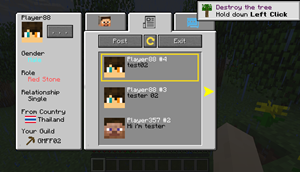
How to use the location and player selection (for example in the teleport, tnt, waypoint or contacts app) (see picture)

How does the storage system work: As in a real phone, you have an x amount of gigabytes available. I choose to simulate this by adding a storage system. This is purely done to prevent anything related to too to many data stored in one item things. All data (mails, messages, contacts, waypoints, apps) are counted for 1 GB each. So if you have 200 waypoints for some reason, you have 200gb of storage. When you reach your max amount of storage (512gb) you can’t create any new items that need storage (notes, waypoints etc.). One exception are the messages, those will clean themselves automatically (after 50 messags in a conversation, it will remove the oldest 40 so there are 10 left, and images will be automatically timed out after around 2 more images are send).
How to buy apps: Gather some emeralds (a lot if you want some overpowered apps) and open your settings, search for the account settings and type any amount of money you need (default is all your emeralds in your inventory). After this, press add and your balance should update. When you have enough money, open the store and search for the app you want and buy it. Delete an app by selecting any bought app and clicking on remove to remove the selected app.
How does the router work: The router is mainly used for the messages app. However, some apps do need a EyeNet connection (e.g. just for realism). When you send a message to someone, it will send a message to yourself directly and to the router. This router then stores the message untill it is able to send it to the recieving player. When the player is online and the player has their EyePhone, the router will send the message to the player (one message per tick, so there might be some delay). This system allows you to send messages to players, even if they are offline. However the big catch of this system is that the router needs to store all those unsend messages. To prevent any unnesseccery cluttering of data, the max storage of a router is 100 messages. When the router reaches it’s max storage, it will explode and delete around 40 messages. The amount a router stores is clearly indicated by its appearance, it will emit smoke if it stores something (1-100 messages) and it will start to be on fire when it stores 90+ messages. This is also indicated with an comparator output, reaching 15 when it stores 99 messages. This system allows you to automatically disable a router when it reached its capacity with some nice redstone contraptions.
How does the charger work: The charger randomly charges itself to provide power to your EyePhone. It will output a comparator signal based on the amount of charges it has (0-8), allowing for some nice automatically refreshing charge systems.
What about future?: The next steps for this project is to seperate the apps with the eyephone, allowing the base eyemod to be used as a dependency, meaning, making it easy to code apps yourself in a seperate mod. This also comes with removing current dependencies that I used in this version. There is no intent to port this mod to forge. Feel free to share ideas, this really helps me (for instance, the camera also was suggested, something I did not think about).
I hope you enjoy the mod, please share any feedback or ideas 🙂
(While my name here is Podloot (pencil), my name on planetminecraft is R-craft)
(Credits to LibGUI for creating the baseline of the GUI)
It is fine if you want to write about/review/showcase this mod, gladly so! However, if you include a link, make sure to link this curseforge post or the pmc page (since I do not allow for thrid party distributions of the mod). Thanks in advance!



Add a comment