

 Get 0.05 TON 💎
Earlier Versions
| Name | Size | Uploaded | Game Version | Downloads | |
| graphingcalculator3d-1.9.1.jar release | 822.30 KB | Sep 15, 2021 | 1.12.2 | 0 |  Download Download |
| graphingcalculator3d-1.8.4.jar release | 808.10 KB | Sep 14, 2021 | 1.12.2 | 0 | Download |
| graphingcalculator3d-1.8.3.jar release | 806.84 KB | Dec 16, 2019 | 1.12.2 | 664 | Download |
| graphingcalculator3d-1.8.1.jar release | 806.90 KB | Dec 15, 2019 | 1.12.2 | 27 | Download |
| graphingcalculator3d-1.7.jar release | 786.04 KB | Dec 5, 2019 | 1.12.2 | 40 | Download |
| graphingcalculator3d-1.6.4.jar release | 780.92 KB | Dec 3, 2019 | 1.12.2 | 21 | Download |
| graphingcalculator3d-1.6.3.jar release | 780.91 KB | Dec 3, 2019 | 1.12.2 | 15 | Download |
| graphingcalculator3d-1.6.1.jar release | 780.27 KB | Dec 2, 2019 | 1.12.2 | 18 | Download |
| graphingcalculator3d-1.5.jar release | 774.00 KB | Nov 29, 2019 | 1.12.2 | 28 | Download |
| graphingcalculator3d-1.4.2.jar release | 760.78 KB | Nov 15, 2019 | 1.12.2 | 44 | Download |
| graphingcalculator3d-1.3.jar release | 760.66 KB | Nov 14, 2019 | 1.12.2 | 27 | Download |
| graphingcalculator3d-1.2.1.jar release | 755.08 KB | Nov 8, 2019 | 1.12.2 | 41 | Download |
| graphingcalculator3d-1.2.jar release | 754.52 KB | Nov 8, 2019 | 1.12.2 | 18 | Download |
| graphingcalculator3d-1.1.jar release | 751.65 KB | Nov 6, 2019 | 1.12.2 | 27 | Download |
| graphingcalculator3d-1.0.jar beta | 723.21 KB | Nov 3, 2019 | 1.12.2 | 27 | Download |
Screenshots


Description
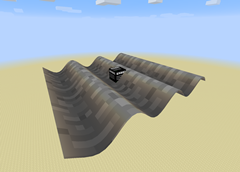
This mod provides numerous blocks which allow for the graphing of 3D functions. The graphs are highly customizable by the player, and with the correct settings can look very fine indeed.
Graphs can be saved in-game for later viewing through the use of Graphing Calculator Memory Card items.
Graphs can be scaled, translated, rotated, colored, and textured. You can alter their domain, range, resolution, discontinuity threshold, and texture size, among other things.
Information about everything can be found within the calculator GUI, by hovering your mouse over the far right of a text field.
Functions are inputted via an easy-to-use set of GUI blocks, as shown in the images tab.
You can also color the graph by the magnitude of its slope at a given point, or toggle collisions so that entities can interact with them.
Graphs can be toggled with a redstone signal, allowing for disappearing floors and other cool building accessories.
Rendering performance is comparable in efficiency to that of Minecraft's standard terrain.
Here is a list of all the coordinate systems currently supported. With each of them, save for Cartesian*, you can view any variable as a function of the other two.
*Spoiler, it looks the same.
– Cartesian
– Spherical
– Cylindrical
– Conical
– Toroidal
– Bipolar Cylindrical
– Parabolic Cylindrical
– Parabolic
– 6-Sphere
– Oblate Spheroidal
– Prolate Spheroidal
– Elliptic Cylindrical
Examples of some neat graphs can be found in the website's images tab.
An overall tutorial/showcase video:
Using the block GUI:



Add a comment