


 Get 0.05 TON 💎
Earlier Versions
| Name | Size | Uploaded | Game Version | Downloads | |
| guiclock-fabric_1.19.x-3.2.jar release | 12.54 KB | Jun 7, 2022 | 1.19 | 0 |  Download Download |
| guiclock-fabric_1.19.x-3.0.jar release | 12.57 KB | Mar 2, 2022 | 1.19-Snapshot | 218 | Download |
| guiclock-fabric_1.18.x-3.0.jar release | 15.48 KB | Nov 30, 2021 | 1.18.2 | 7,067 | Download |
| guiclock-fabric_1.17.x-3.0.jar release | 15.84 KB | Nov 23, 2021 | 1.17.1 | 437 | Download |
| guiclock-fabric_1.16.x-3.0.jar release | 15.68 KB | Nov 23, 2021 | 1.16.5 | 219 | Download |
| guiclock-fabric_1.17.x-2.6.jar release | 15.39 KB | Oct 25, 2021 | 1.17.1 | 732 | Download |
| guiclock-fabric_1.16.x-2.6.jar release | 15.23 KB | Oct 25, 2021 | 1.16.5 | 69 | Download |
Description


Requires the library mod Collective (Fabric) and the Fabric API.
This mod is part of The Vanilla Experience.
GUI Clock is a minimalistic client-side mod which shows the time in the GUI on the screen when a clock is in the inventory. It can show in-game time or real time, and can be in the 24 hour format or with AM/PM. It can also show the world's age in days below the time. Instead of showing the time in numbers it's also possible to display the clock icon on the screen instead, can be enabled in the config.
By default the clock will automatically be lowered when a potion effect is active.
You may also be interested in GUI Compass.
Configurable: ( how do I configure? )
mustHaveClockInInventoryForGameTime (default = true): When enabled, will only show the game time when a clock is present in the inventory.
mustHaveClockInInventoryForRealTime (default = true): When enabled, will only show the real time when a clock is present in the inventory.
lowerClockWhenPlayerHasEffects (default = true): Whether the clock in the GUI should be lowered when the player has potion effects to prevent overlap.
_24hourformat (default = true): Sets the format of the clock to the 24-hour format.
showOnlyMinecraftClockIcon (default = false): When enabled, shows the clock item icon instead of a clock with numbers.
showBothTimes (default = false): Show both in-game time and real local time.
showRealTime (default = false): Show actual local time instead of in-game time.
showRealTimeSeconds (default = false): Show the seconds in the clock.
showDaysPlayedWorld (default = true): Show the days played in the world.
clockPositionIsLeft (default = false): Places the GUI clock on the left.
clockPositionIsCenter (default = false): Places the GUI clock in the middle.
clockPositionIsRight (default = true): Places the GUI clock on the right.
clockHeightOffset (default = 5, min 0, max 3000): The vertical offset (y coord) for the Clock. This determines how far down the time should be on the screen. Can be changed to prevent GUIs from overlapping.
clockWidthOffset (default = 0, min -3000, max 3000): The horizontal offset (x coord) for the Clock.
RGB_R (default = 255, min 0, max 255): The red RGB value for the clock.
RGB_G (default = 255, min 0, max 255): The green RGB value for the clock.
RGB_B (default = 255, min 0, max 255): The blue RGB value for the clock.
The 24-hour clock.
The 12-hour clock.
The 24 hour clock with the PC's local time next to it.
The day counter:
And with the config option 'showOnlyMinecraftClockIcon' enabled:
With the config option 'lowerClockWhenPlayerHasEffects' enabled, the clock will automatically be lowered when a potion effect is active: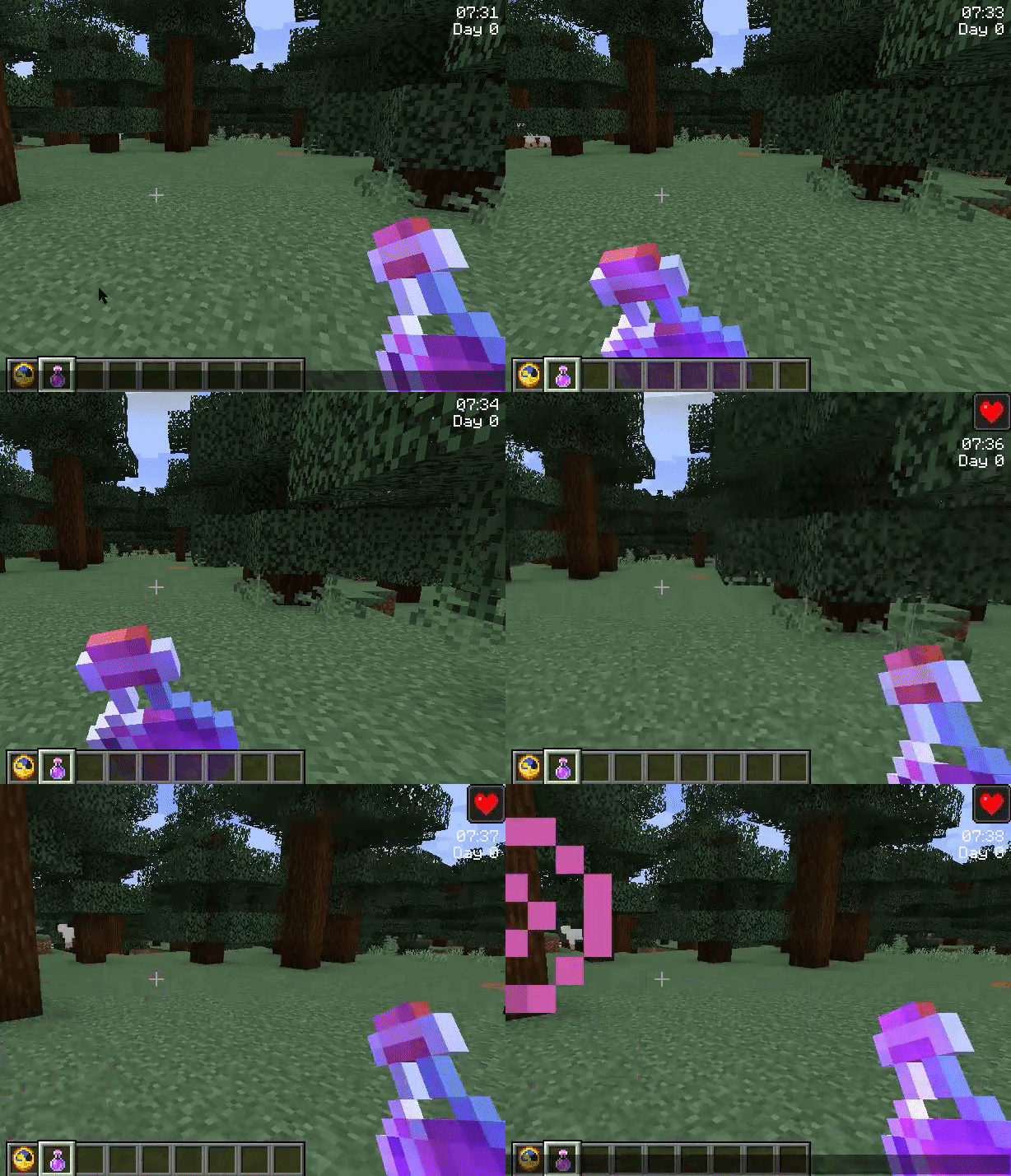


![Legendary Tooltips [Fabric]](https://files.minecraftpatch.com/addons_new/legendary-tooltips-fabric-542478/screenshots/legendary-tooltips-fabric-scr-1-mini.png)
Add a comment