


 Get 0.05 TON 💎
Earlier Versions
| Name | Size | Uploaded | Game Version | Downloads | |
| HomeStations v1.8 release | 35.72 KB | Jan 10, 2018 | 1.12 | 349 |  Download Download |
| HomeStations v1.7 release | 32.23 KB | Oct 18, 2016 | 1.10 | 394 | Download |
| 1.6 release | 27.93 KB | Mar 4, 2016 | 1.9 | 501 | Download |
| 1.5 release | 27.79 KB | Feb 15, 2014 | 1.7.4 | 1,733 | Download |
| 1.4 release | 27.66 KB | Feb 14, 2014 | 1.7.4 | 258 | Download |
| 1.3 release | 27.65 KB | Feb 14, 2014 | 1.7.4 | 219 | Download |
| 1.1 release | 26.78 KB | Aug 24, 2013 | 1.6.4 | 1,559 | Download |
| 1.0 release | 26.78 KB | Aug 23, 2013 | 1.6.2 | 647 | Download |
Screenshots
Description
Report a bug or suggest a feature
HomeStations offers home <-> spawn teleportation via special "stations" built by anyone in the world. This is a nice alternative to the common /home plugins, but without the need for players to use commands.
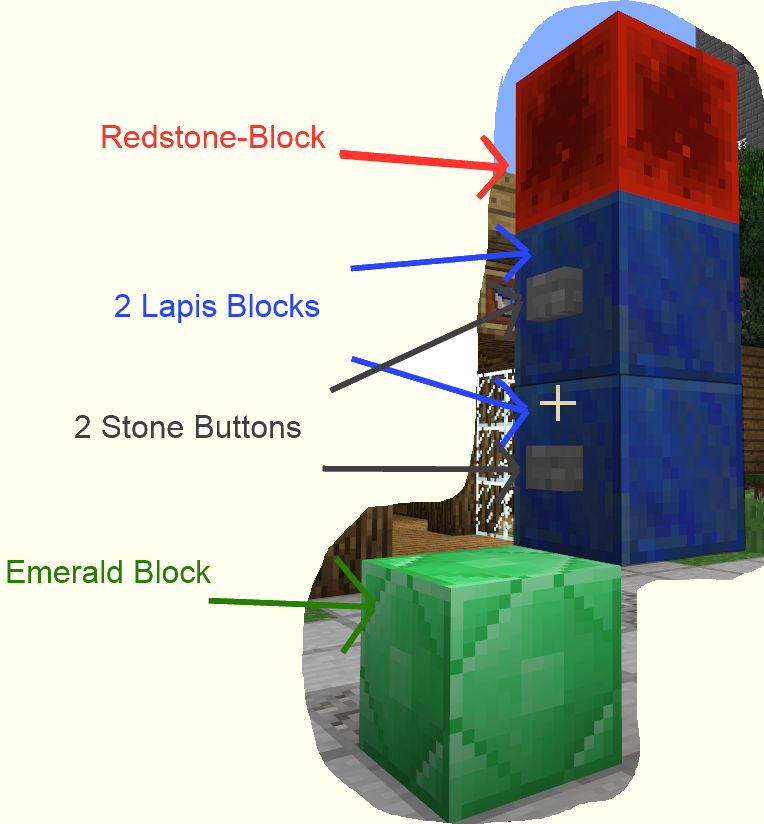
A station is a special structure built like shown on the following image:
Note, that while a station has to be built like this, you can make the station prettier by building something around, just the way you like it.
You could for example place some glowstone around or have some sort of podium with stairs around the emerald block.
The layout of those stations is not (yet) configureable.

As Admin
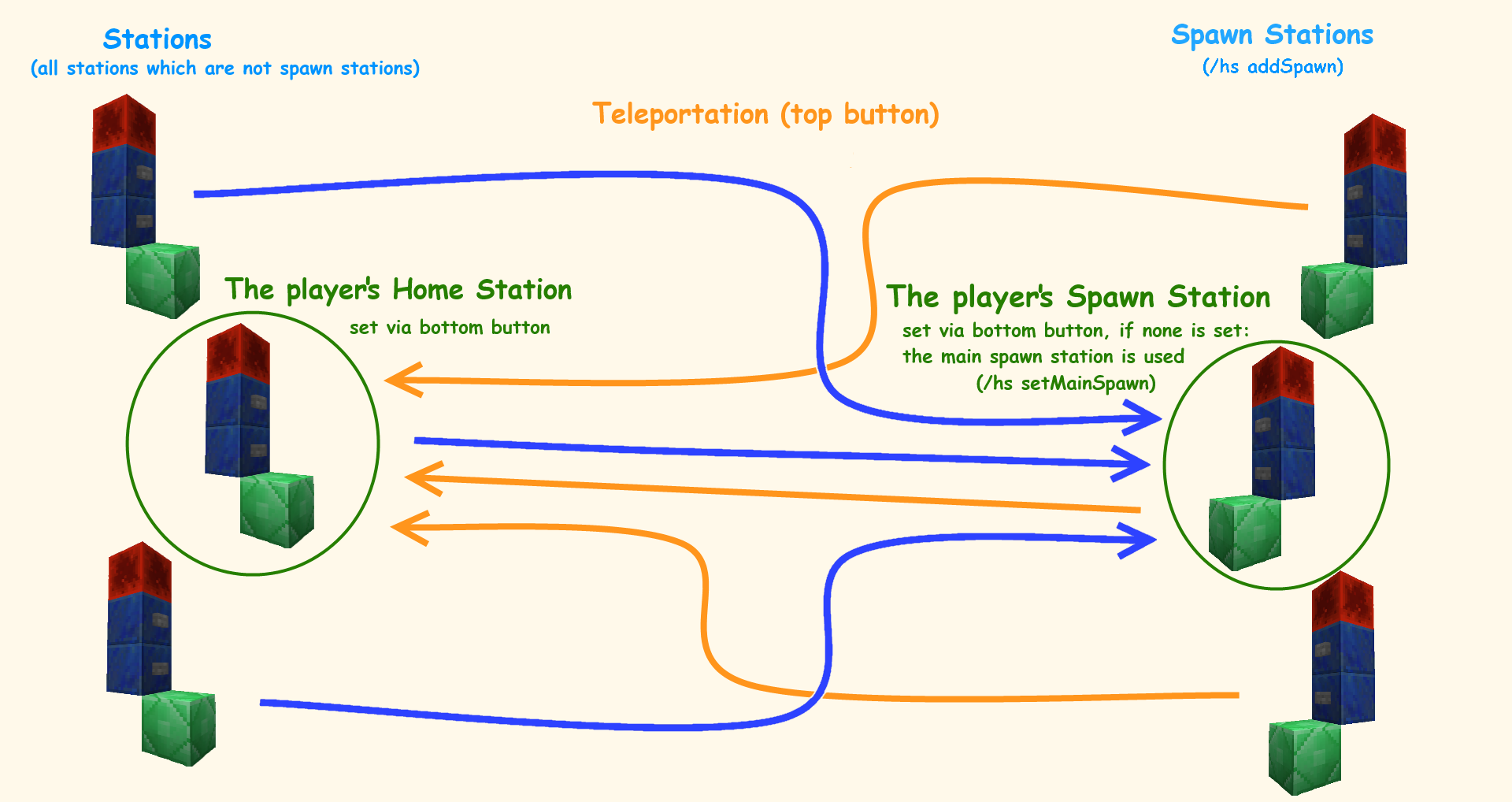
As admin you can build any number of those stations at certain points of interest on your server and then define them as Spawn-Stations by standing on the emerald block and typing /homestations addSpawn. Players will be able to teleport from those Spawn-Stations to their individual Home-Station, and players can select one of those Spawn-Stations as their personal Spawn-Station by pressing the lower button on it. They will then be able to teleport to this individually selected Spawn-Station from any other non-spawn station (including from their personal Home-Station).
Additionally server admins can define one Main-Spawn-Station via command. Players will teleport to this Spawn-Station whenever they have not defined a personal Spawn-Station yet.
As Player
Players can build any number of stations wherever they want in the world. They will be able to teleport from those stations to their individually selected Spawn-Station (or the Main-Spawn-Station defined by an admin, if no individual Spawn-Station was selected yet).
However, players can only select one of those stations as their individual Home-Station by pressing the lower button on that station. They will then be able to teleport from any Spawn-Station back to this specific Home-Station.
Teleporting works by simply pressing the upper button on a station.

Commands
Aliases for "homestations" are: "homestation", "hs"
/homestations addSpawn – Defines a normal station as spawn station.
/homestations setMainSpawn – Defines the main spawn station. It doesn't matter if this station was a spawn station already before.
Permissions
homestation.use – Allows using of those stations.
homestation.admin – Allows defining of spawn stations and setting of the main spawn station.
Configuration
1 2 3 4 5 6 7 8 9 10 11 12 13 14 15 16 17 18 19 20 21 22 23 24 25 26 |
Firework Effect 1: Colors: - 255;165;0 Fade Colors: - 255;0;0 Flicker: true Trail: true Firework Effect 2: Colors: - 255;255;0 Fade Colors: [] Flicker: true Trail: false Upward: Teleport: Y Velocity: 2.0 Delay in Ticks: 15 Effect: Maximum Range: 80.0 Distance between Fireworks: 2.5 Downward: Effect: Offset: 3.0 Teleport: Y Offset: 3.0 Teleport Costs: 0.0 |
Donations
If you like this plugin, consider supporting its development by making a donation.
Thanks in advance!


Add a comment