


 Get 0.05 TON 💎
Earlier Versions
| Name | Size | Uploaded | Game Version | Downloads | |
| Hyper Lighting 1.18.x 1.0 release | 782.55 KB | Dec 5, 2021 | 1.18 | 0 |  Download Download |
| Hyper Lighting Forge 1.17.1 1.0.1 release | 796.57 KB | Aug 18, 2021 | 1.17.1 | 387 | Download |
| Hyper Lighting 1.16.5 1.0.1 release | 819.06 KB | Jul 14, 2021 | 1.16.5 | 866 | Download |
| Hyper Lighting 1.16.5 1.0 release | 816.96 KB | Jul 10, 2021 | 1.16.5 | 86 | Download |
| Hyper Lighting 1.12.2 1.5 release | 1.14 MB | Jul 10, 2021 | 1.12.2 | 741 | Download |
| Hyper Lighting 1.12.2 1.4 release | 1.14 MB | Nov 29, 2020 | 1.12.2 | 2,448 | Download |
| HyperLighting-1.12.2_1.3.1.jar release | 1.11 MB | Sep 29, 2020 | 1.12.2 | 519 | Download |
| HyperLighting-1.12.2_1.3.jar release | 1.10 MB | Sep 21, 2020 | 1.12.2 | 295 | Download |
| HyperLighting-1.12.2_1.2.jar release | 400.34 KB | Jul 13, 2020 | 1.12.2 | 778 | Download |
| HyperLighting-1.14.4-1.0.jar release | 233.40 KB | Jun 3, 2020 | 1.14.4 | 338 | Download |
| hyperlighting-1.12.2_1.1.jar release | 237.35 KB | Apr 22, 2020 | 1.12.2 | 754 | Download |
| hyperlighting-1.12.2_1.0.jar release | 135.88 KB | Apr 14, 2020 | 1.12.2 | 168 | Download |
Screenshots


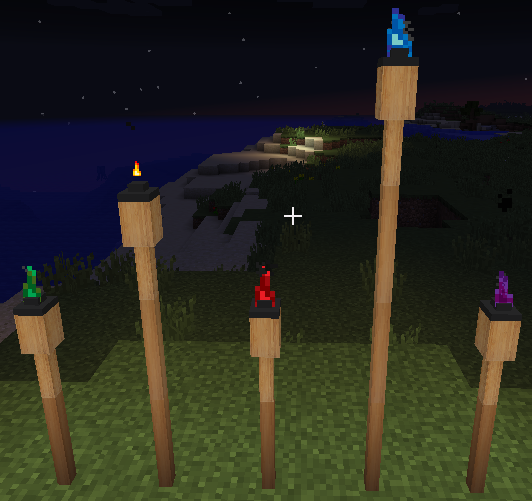
Description

Times are tough and Covid-19 has caused me to lose my second income. If you can at all, I ask that you please consider Becoming a Patron to help me pay for my test server, build server, website, maven and internet costs that are involved in building and maintaining my mods. It's not at all required for you to do this, but if you can at all, I would greatly appreciate it. You will be included in a list of donators if you want.
About
Hyper Lighting adds new and sometimes useful light sources to Minecraft. It was originally created to just add a single torch to the game that could be turned on and off. It has since involved into a much bigger mod and it now even adds colored lighting to the game with the help of addon mods.
Light Sources
The light sources added by this mod includes:
- Torches that can be turned on and off (based on the Default Minecraft Torches)
- Lanterns that can be turned on and off
- Tiki Torches (cause why not)
- Underwater Lantern/Torch (Yes they work underwater. Why? Spongebob makes campfires underwater and you wanna ask me why??)
- Candles
- Disco Light (Because reasons)
- Candle in a Jar (A handheld item that emits light as you move. See DEMO VIDEO here)
- Colored Redstone Lamps (A colored variation of the minecraft redstone lamps)
- Solar Powered Fence Lights A Solar Powered Fence light with remote switches
- Switch Box A block used to control up to 6 Solar Powered Fence Lights
- Campfires 2 Campfires based on the Minecraft 1.15 campfires. Both allow you to cook food
- Button lights Button Shaped Lights that are always on. Think of them as night lights
- Fluorescent Lights Battery Powered, dyeable fluorescent lights
- Jack O Lanterns Halloween Themes Pumpkin lights
- Fog Machine WHOOOOO!!! FOG MACHINE!!!!!! Dye it, smoke it, enjoy it
- Lava Lamps (Does not actually use lava!)
- Neon Signs Editable neon signs for your base, dungeon, um 50 shades of grey room or whatever
- Unclear glass Useful for when you want to spy on your hot neighbour without letting light in
- Solar Panel because power
All the light sources added by this mod (Excluding the Underwater Torch, Lantern, Candle in a Jar, and Disco Light), come in 12 different colors. They can emit colored light by using addon mods. See more info here.
Important 1.14.4 Notes
Some aspects of this mod differs between version 1.12.2 and 1.14.4. They are:
- Candle in a Jar only works when Hyper Lighting Colored Light Core is installed.
- Some crafting recipes have changed. If a recipe doesn't work, please visit the wiki
- Candle in a Jar works underwater in 1.14.4
- Since 1.13, forge no longer has mod Config screens. Hyper Lighting settings can be accessed by pressing "HOME" on your keyboard.
A NOTICE TO MODPACK MAKERS:
You are allowed to use Hyper Lighting in your modpack, BUT, you need to provide a bug report link for your modpack! If my github becomes full of bug reports relating to your modpack and not my mod, you will lose your permission to use my mod in your pack.
Be reminded that HL and HL core is released under an ALL RIGHTS RESERVED license and using my mod in your pack when your permission was revoked, would mean that you are breaking they law.
Getting Support
You can get support for this mod via email (hypherionmc at gmail dot com) or on my discord server. For certain support items there are certain steps to follow.
- For Issues – Log a new Issue on GitHub (Include your game, forge, java and mod version. If it's a game crash, include your crash log as well)
- For anything else, use the above email or discord server.
Latest Dev Builds
Click on the badge to download the latest dev build (Warning. May contain bugs)
1.12.2:
1.14.4:

Credits
- Zeitheron – Developer of Colored Lux for his help in getting Colored Lighting working
- Tohru – Suggested adding more colors to light sources
- nathanjj09 – For suggesting the new Torch Lighter Tool Texture
- Torch Lighter Tool – Texture used from this link
- Mysticpasta1 – For his texture contributions, testing and suggestions
- DeatH_Mare – For his help in testing and suggestions


![Upsizer Mod [FORGE]](https://files.minecraftpatch.com/addons_new/upsizer-mod-forge-237514/screenshots/upsizer-mod-forge-scr-1-mini.png)
Add a comment