

![minecraft mod Upsizer Mod [FORGE]](https://files.minecraftpatch.com/addons_new/upsizer-mod-forge-237514/screenshots/upsizer-mod-forge-scr-1-mini.png)
 Get 0.05 TON 💎
Earlier Versions
| Name | Size | Uploaded | Game Version | Downloads | |
| upsizer-mc1.16.4-6.1.1.jar release | 22.09 KB | Jan 18, 2021 | 1.16.5 | 49,857 | ![download Upsizer Mod [FORGE] upsizer-mc1.16.4-6.1.1.jar release](https://minecraftpatch.com/wp-content/themes/template/img/download.png) Download Download |
| upsizer-mc1.16.4-6.1.jar release | 21.85 KB | Dec 15, 2020 | 1.16.4 | 11,544 | Download |
| upsizer-mc1.16.3-6.0.jar release | 15.59 KB | Sep 17, 2020 | 1.16.3 | 8,170 | Download |
| upsizer-mc1.15.2-5.1.jar release | 15.33 KB | Mar 1, 2020 | 1.15.2 | 46,727 | Download |
| upsizer-mc1.14.4-5.0.jar release | 15.31 KB | Feb 15, 2020 | 1.14.4 | 5,596 | Download |
| upsizer-mc1.12-4.0.1.jar release | 11.88 KB | Jan 13, 2018 | 1.12.2 | 93,476 | Download |
| upsizer-mc1.12.1-4.0.jar release | 12.28 KB | Sep 3, 2017 | 1.12.2 | 2,912 | Download |
| upsizer-mc1.11.2-3.1.jar release | 12.28 KB | Apr 25, 2017 | 1.11.2 | 1,520 | Download |
| upsizer-mc1.11-3.0.jar release | 12.15 KB | Feb 25, 2017 | 1.11 | 1,214 | Download |
| upsizer-mc1.8.9-1.0.3.jar release | 11.44 KB | Dec 6, 2016 | 1.8.9 | 2,689 | Download |
| upsizer-mc1.8.9-1.0.2.jar release | 11.40 KB | Nov 24, 2016 | 1.8.9 | 166 | Download |
| upsizer-mc1.8.9-1.0.1.jar release | 11.40 KB | Jul 11, 2016 | 1.8.9 | 294 | Download |
| upsizer-mc1.8-1.0.jar release | 10.76 KB | Apr 30, 2016 | 1.8 | 7,948 | Download |
| upsizer-mc1.14.4-5.0b4.jar beta | 15.32 KB | Dec 8, 2019 | 1.14.4 | 3,511 | Download |
| upsizer-mc1.14.4-5.0b2.jar beta | 15.14 KB | Sep 7, 2019 | 1.14.4 | 128,777 | Download |
| upsizer-mc1.14.3-5.0b1.jar beta | 14.65 KB | Aug 7, 2019 | 1.14.3 | 377 | Download |
| upsizer-mc1.14.2-5.0b1.jar beta | 14.57 KB | Jun 12, 2019 | 1.14.2 | 801 | Download |
| upsizer-mc1.11.2-3.1r01.jar beta | 12.26 KB | Apr 10, 2017 | 1.11.2 | 8,849 | Download |
| upsizer-mc1.11-3.0r01.jar beta | 12.15 KB | Jan 26, 2017 | 1.11 | 311 | Download |
| upsizer-mc1.8-1.0r10.jar beta | 10.65 KB | Feb 21, 2016 | 1.8 | 466 | Download |
Screenshots
![Upsizer Mod [FORGE]](https://files.minecraftpatch.com/addons_new/upsizer-mod-forge-237514/screenshots/upsizer-mod-forge-scr-1.png)
![Upsizer Mod [FORGE]](https://files.minecraftpatch.com/addons_new/upsizer-mod-forge-237514/screenshots/upsizer-mod-forge-scr-2.png)
Description
What The Mod Does
This mod does one thing– it up-sizes or increases the max stack size per slot of various Minecraft items in inventories (player, chests, dispensers, etc.). Ever get frustrated that you can stack 64 anvils into a slot but only 16 eggs? Or that it's OK to stack 64 fences and gates, but only 16 signs? Well be frustrated no more! Stack your eggs to the sky (well, 64 high)! Need to carry a double-chest's worth of lava buckets? Just stack those empties to 64 and head to the nearest lava lake– 64 lava buckets, 1 slot, done!
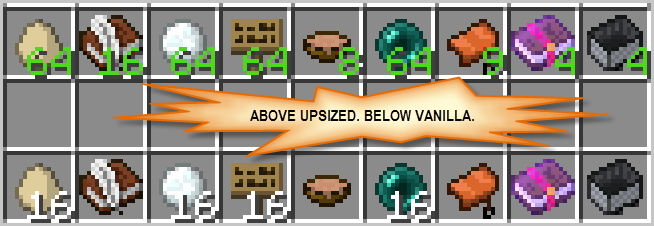
Out of the box, upsizer mod will up-size items that are already stackable like signs, eggs, empty buckets, etc. However, you can also up-size items that are limited to just one item per slot by default (but first, read "the warning" below). Up-sizing is not limited to vanilla Minecraft items, you can also extend the mod's configuration to up-size items from other mods.
MC 1.16.2/.3/.4/.5 Mod Requirements
- Minecraft 1.16.2,1.16.3,1.16.4,1.6.5
- Forge (recommended build to match 1.16.x using)
- Client and Server use
MC 1.15.2 Mod Requirements
- Minecraft 1.15.2
- Forge (recommended build)
- Client and Server use
MC 1.14.4 Mod Requirements
- Minecraft 1.14.4
- Forge (recommended build)
- Client and Server use
MC 1.12/.1/.2 Mod Requirements
- Minecraft 1.12,1.12.1,1.12.2
- Forge (recommended version for the MC you're using)
- Client and Server use
More versions (OLDIES)
MC 1.11.2 Mod Requirements
- Minecraft 1.11.2
- Forge (at least forge-1.11.2-13.20.0.2255)
- Client and Server use
MC 1.11 Mod Requirements
- Minecraft 1.11
- Forge (at least 1.11-13.19.1.2188)
- Client and Server use
MC 1.8.9 Mod Requirements
- Minecraft 1.8.9
- Forge (at least 1.8.9-11.15.1.1722)
- Client and Server use
MC 1.8 Mod Requirements
- Minecraft 1.8
- Forge (at least 1.8-11.14.3.1450)
- Client-side use
And Now, The Warning…
When deciding what you should up-size keep the following three categories of items in mind:
- Upsize-ready (Harmless) Items – these are items that already support multiples per slot but have some imposed limit in the interest of "fair" or "balanced" game-play or some such thing. Examples include: signs, banners, eggs, ender pearls, buckets. Up-sizing these should not trigger any issues unless there is another mod installed that requires the vanilla stack size (which would be odd but you never know).
- Damageable Items – these are items that can take damage and are probably limited to one-per-slot as each damage level is effectively a new type of item. Up-sizing these sort of items is most effective for storing multiple new or undamaged items. You should still only use these items with one per inventory slot. In fact, when crafting new items don't even have a damaged version in your inventory as Minecraft might merge the new items into the same slot as the damaged one(s). If you intend to use standard enchanting mechanics, you should NOT upsize damageable items as that flags them as not enchantable (if you're using modded mechanics or enchanting table, upsizing may or may not be possible.) Examples include: tools, weapons, and armor.
- Contained/er and other special use Items – these items may be limited because of how they are used. Up-sizing these items is also just a way to increase your storage of unused items as Minecraft is often hard-wired to assume use of a single unstacked item at a time. Examples include: cakes, horse armor, filled buckets, filled potion bottles, and enchanted books.
So here it is officially, "the warning": when you up-size items that are usually limited to a single item per inventory slot, pay attention before using the stacked items as a single item (this goes for using the item directly or indirectly via crafting or smelting). Or better yet, save yourself any pain and just don't do that. Store the items stacked; always unstack to a single item before using.
Potion Bottles [mc-1.8.x]
Do NOT up-size filled potion bottles (aka water bottles) unless you don't plan to use them for brewing. Minecraft requires that the potion items have a max stack size of 1; anything else is rejected and you cannot put that item into the brewing stand's inventory slots.
Item Filters, Timers, and Sorters With Hoppers
If you have built standard item sorters or filters with hoppers for some of the items you want to up-size, you might need to adjust your hopper filters. If you're using an upsized item in a hopper timer, you will definitely need to adjust it. In particular, you will need to make sure the number of filler items you use in the filter or timer hopper is adjusted for the new max stack size. Normally, items like eggs and ender-pearls stack to 16 and so you'd use perhaps 12 filler items in your hopper filter; if you increase the max stack size for eggs or ender-pearls, you will need to adjust the number of filler items up (the exact change, if any, would depend on you filter's design and the max stack size you've chosen).
Configuration
You can control whether upsizer mod will touch a particular item or particular class of item (tools, weapons) by changing its configuration file (wabbity_upsizer.cfg [1.11-1.12.2] or wabbity_upsizer.toml [1.14.4+]). Note that out-of-the-box, the mod will only change items in the "Harmless" category as described above. All other items require that you add or change the proper configuration option. To up-size something, you need to tell upsizer mod to both check for that item and what the new max stack size should be. Read the linked config file for an example of how to do this. Post in the Comments section if you have any questions.



Add a comment