


 Get 0.05 TON 💎
Earlier Versions
| Name | Size | Uploaded | Game Version | Downloads | |
| nahkd's ItemManager v1.0.0 (1.10+) beta | 9.12 KB | Jul 16, 2017 | 1.12 | 170 |  Download Download |
Screenshots


Description
NOTE: This plugin required nahkdAPI. Can download it from here

Welcome to ItemManager, a new way to edit item!
All features:
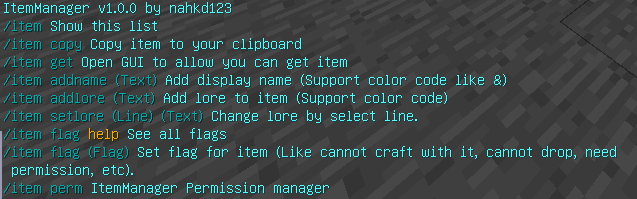
– Copy to clipboard and get item from clipboard!
– Item flags!
– Permission Manager!!! (Not plugin permission, just a permission to allow player can use item)
How to make for your own custom item
1. Hold any item you want.
2. Type "/item addname (Item name here, support color code like &)"
3. Add lore to your item by typing "/item addlore (Lore here, support color code)" (Lore mean the text under item name)
4. If you type wrong (only lore), type "/item setlore (Lore number, start from 0) (New lore,support color code)" (For display name type "/item addname (Name here)")
5. Save this item by typing "/item copy" so if you lost item you can type "/item get" to get item back.
Add permission to item so player need permission to use:
1. Type "/item perm add (Permission)"
2. Hold a item and type "/item flag PERM (Permission that you type before)"
3. Give item to any player you want, also to allow player use item, type "/item perm pladd (Playername) (Permission you type before)".
4. If you don't want player use item anymore, type "/item perm plremove (Playername) (Permission you type before)"
NOTE: Permission is a item permission, not plugin permission.
Plugin Permission:
itemmanager.op          | Allow player to use command "/item"
                        | Default: op
FAQ:
(There is no FAQ here. You can come back later to see more.)




Add a comment