


 Get 0.05 TON 💎
Earlier Versions
| Name | Size | Uploaded | Game Version | Downloads | |
| quantum_encapsulation-0.2.3.jar release | 2.02 MB | Jul 4, 2022 | 1.19 | 0 |  Download Download |
| 0.2.2 release | 2.02 MB | Jul 3, 2022 | 1.19 | 6 | Download |
| quantum_encapsulation-0.2.1.jar release | 2.02 MB | Jul 2, 2022 | 1.19 | 18 | Download |
| quantum encapsulation version 0.2.0 release | 2.02 MB | Jun 9, 2022 | 1.19 | 86 | Download |
| quantum encapsulation version 0.1.2 release | 2.38 MB | Oct 5, 2021 | 1.18-Snapshot | 219 | Download |
| quantum_encapsulation-0.1.1.jar release | 2.30 MB | Sep 25, 2021 | 1.18-Snapshot | 69 | Download |
| quantum_encapsulation-0.1.0.jar release | 2.27 MB | Jul 27, 2021 | 1.17.1 | 561 | Download |
| quantum_encapsulation-0.1.0.jar beta | 2.27 MB | Jul 27, 2021 | 1.17.1 | 50 | Download |
Description
Quantum Encapsulation is a unique Minecraft mod that lets you customize the flow of time within a specified region.
#DISCLAIMER: This mod will NOT be developed for forge and is only available for fabric. Moreover, this mod is currently in quite an unstable state. Glitches and bugs may occur inevitably. And please read the instructions below carefully, as it requires some setup to run properly.
–THIS MOD REQUIRES 1.17.1 FABRIC API TO RUN!–
TRAILER:
How does it work?
There are two ways by which you can encapsulate a region :
Quantum Encapsulator is a block, when powered with redstone, that projects a specified region with bounds and details as indicated in its data.
Let me walk you through each process.
1.Launcher Settings (Mandatory):
After you have placed .jar file in the mods folder, you must append the following command-line JVM argument to your launcher fabric instance. Otherwise, sound rewinding may not work properly.

For you to copy-paste here : –add-opens java.base/java.io=ALL-UNNAMED
2.During first launch
During your first launch, the mojang loading screen may take extraordinarily longer. Don't worry, this only happens during the first boot with the mod installed, and the mod is working to automatically generate rewind sound files.

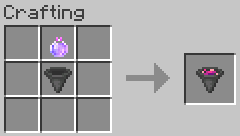
3.Crafting a quantum encapsulator
Refer to the following recipes to craft them (they are usable in survival as well)


Right-click to open the quantum encapsulator GUI.
Time Multiplier specifies how fast the time should flow relatively (1.0 = default, 2.0 = twice fast, 0.5 = twice slower, 0.0000001 = time stop (essentially))
Size defines the bounds of the region ( X * Y * Z )
Position defines the relative position of the region from the encapsulator block
The angle selectors define the relative rotation of the region around the encapsulator block

When you are done, press "Done" and activate the block by any means of Redstone power.

Once you are done, enter the region to verify the time flow. You may make changes to the region settings anytime, and it will have effect real-time.
Next, you may also utilize the "time manipulation device" to achieve the same.
The recipe is as follows:

Now, there are various functions of this device.
(Note that the controls are defined as default)
Right Click – Set Corner (Two corners at maximum)
Z – Create region based on two corners set
K – Select the region where cursor is contained
Shift+K – Select the nearest region regardless of cursor
C – Move/Place the selected region.
Shift+C – Move/Place the selected region, while also moving the blocks and entities within it.
Shift + Scroll – When no region is selected or moving a region, this controls the reach distance of the cursor.
Otherwise, this increases/decreases the time multiplier of the selected region.
Hold Shift + Right Click – Charge the impact power. The longer you hold shift, the more powerful the impact force is.
X – Delete the selected region
L – Link the selected region to a mob you are facing (face straight up in the sky to select yourself)
*Note: linked regions synchronize its position with the linked entity. In a sense, you may use it like a "time forcefield" that shields you.
Shift + L – Unlink the selected region
I have demonstrated all the above controls in the video below as well as an example of slowing/accelerating/rewinding time, in case you are confused.
Finally, you may also give yourself the effect "quantum stability" in order to immunize yourself from the region's different flow of time. This is currently only available through command, but I am planning to make it survival-compatible in the next release.
Commands: (All require permission level of 2)
/quantumfill <x1> <y1> <z1> <x2> <y2> <z2> <time multiplier>
Manually specify a quantum region with a given time multiplier.
/quantumquery
Query the ID of the current region that the player is in.
/quantumunfillthis
Delete the quantum region that the player is in.
/quantumclear
Clears all quantum regions in a server.
/effect give <player selector> quantumencapsulation:quantum_stability 100000 255 true
Immunize the player from the region's flow of time.
/stats
Display statistics about server's memory usage and how much data has been saved for rewinding time (Rewinding time obviously requires recording in-game events)
Engine size : #no. of last ticks saved. If 5000, it means that all events in last 5000 ticks have been saved.
entity map size : #no. entities being tracked for recording.
/engineMaxSaveTime <ticks>
Sets the maximum save duration for the time rewind system. For instance, executing command /engineMaxSaveTime 3000 means that the server will clear all currently saved data, and begin to remember only the events happened in the last 3000 ticks. 5000 by default.
/setperformancetick <ticks>
Sets the maximum milliseconds per tick at which the server may run. 5 by default. This means that the maximum time multiplier of any region is *10.0. (5 milliseconds per tick = 200 tps).
If set to 2, the maximum time multiplier is *25.0.
If set to 10, *5.0, and so on.
(Formula : Maximum Tps = 50 / <performance tick> * (20 default tps), Maximum Time Multiplier = 50 / <performance tick>)
Setting to 1 may lag the server, although 1 is the maximum!
If your singleplayer world or multiplayer server lags, consider setting the performance tick to a higher number. The maximum is 50!)
FOR SERVER OWNERS/ WHEN PLAYING MULTIPLAYER:
While the mod tries to record client events into server, when handling extremely frequent events like particles / sounds, the mod must use a separate server-client port in order to save both the server and client performance. Hence, in order to rewind particles and sounds properly, the server owner MUST port forward an additional special port. This special port is by default 7555. It may be modified in configs file.
Config file:
After you have started the server / played a singleplayer world at least once, you should be able to find a quantum_config.config file in the root directory.
*max-save-time = 5000 => this sets the default max save time for the server. (By default, server only saves the recent 5000 ticks of event in order to rewind time). You may change it during runtime using the /enginemaxsavetime command.
*port=7555 => this configures the special port through which extremely frequent events like particles and sounds may be recorded back and forth between client and server. Please note the warning above, if you are a server host.
Thank you for reading this far! While this mod is ambitious and game-spanning from the developer's perspective, I expect numerous glitches and bugs to occur in the community, especially in sound systems (they are the most unstable and experimental at the moment). Please report any bugs you encounter in the comment below, as it helps me to quickly patch and polish the mod to its refined state.


Add a comment