


 Get 0.05 TON 💎
Earlier Versions
| Name | Size | Uploaded | Game Version | Downloads | |
| WelcomeBack v1.5 beta | 1.89 KB | Jul 25, 2012 | CB 1.2.5-R4.0 | 2,914 |  Download Download |
| Welcome Back v1.2 beta | 2.47 KB | Jul 12, 2012 | CB 1.2.5-R4.0 | 689 | Download |
| WelcomeBack v1.0 beta | 2.46 KB | Jul 5, 2012 | CB 1.2.5-R4.0 | 440 | Download |
Screenshots

Description
Function
WelcomeBack is in early stages of development. Currently, when a player joins a server, along with the normal message ("Player joined the game"), it will also broadcast:
"[Server] Welcome Back, Player"
Images
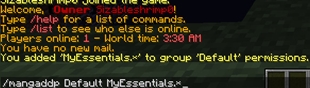
Here is an example of the message displayed when a user joins the game

Benefits
WelcomeBack allows staff members and other players to know who is entering the game faster, as the bright purple text stands out, as opposed to the default yellow text. It also brightens up the chat and makes it more colorful, rather than users just seeing the bland default text colors. WelcomeBack even displays colored text to console, so owners can easily spot when a player joins the game while monitoring the server via console. In the future, WelcomeBack will even help users in identifying the rank of a player as soon as they enter the game, instead of having to wait for them to talk to see what rank they are. Now, there is vanishnopacket support, when a user joins vanished, the usual Welcome Back message will not be displayed.
Future Plans
- Customizable Messages when a player enters the game.
- Message support for when a player joins a server for the first time.
- Support for different variables, such as a player's rank.
Installation
Installing WelcomeBack is pretty easy! Just download WelcomeBack.jar and drop it into your plugins folder, then start the server. There is no need for excess folders or other files as of right now.
Suggestions
If you have any suggestions on what I could add to WelcomeBack to make it even better, feed free to PM me or post a comment here!


Add a comment