

 Get 0.05 TON 💎
Earlier Versions
| Name | Size | Uploaded | Game Version | Downloads | |
| CraftTweaker Highlighter [1.2.6] release | 6.08 KB | Jul 22, 2018 | 1.12.2 | 3,853 | ![download ZenScript Syntax Highlighter for Notepad++ CraftTweaker Highlighter [1.2.6] release](https://minecraftpatch.com/wp-content/themes/template/img/download.png) Download Download |
| CraftTweaker Highlighter [1.2.4] release | 5.94 KB | Jun 2, 2018 | 1.12.2 | 207 | Download |
| CraftTweaker Highlighter [1.2.3] release | 6.60 KB | Feb 11, 2018 | 1.12.2 | 379 | Download |
| MineTweaker Highlighter [1.2.2] release | 6.00 KB | Dec 3, 2017 | 1.12.2 | 243 | Download |
| MineTweaker Highlighter [1.2.1] release | 4.25 KB | Nov 14, 2017 | 1.12.2 | 101 | Download |
| MineTweaker Highlighter [1.2] release | 4.09 KB | Jul 23, 2017 | 1.12 | 293 | Download |
| MineTweaker Highlighter [1.1] release | 3.57 KB | May 4, 2017 | 1.11.2 | 183 | Download |
| MineTweaker Highlighter [1.0] release | 3.09 KB | Apr 16, 2017 | 1.11.2 | 87 | Download |
Screenshots


Description
ZenScript Syntax Highlighter
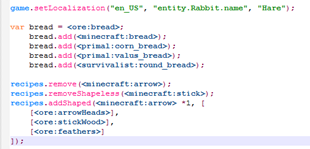
Make modifying Minecraft a breeze with the new ZenScript Syntax Highlighter for Notepad++.
Specificially set up to support MineTweaker methods such as addChestLoot(), addSeed()
Additional support added for methods used by Mods with MineTweaker Integration including BetterBeginnings, Survivalist and Better with Mods.

Support List
Thanks to continued interest and contributors the project now supports a growing list of Mods with integrated MT/CT support.
-
- MineTweaker/CraftTweaker (+JEI)
- Better With Mods
- PrimalCore
- TreeTweaker
- Tinker's Construct
- Thermal Expansion
- Rustic
- Survivalist
- Rock Hounding: Ore Tiers
- Better Beginnings
- LootTweaker
- Mekanism
- Astral Sorcery
- Industrial Foregoing
- Advanced Mortars
- Artisan Worktables
- LootTableTweaker
- Immersive Engineering
- Mod Tweaker
- Actually Additions
- Forestry
- Extra Utilities 2
- Game Stages
- PneumaticCraft: Repressurized
- Charcoal Pit
If you use any other mods that have a CraftTweaker implementation and would like it supported, please send me a link to its ZenScript/CraftTweaker documentation or Wiki. Alternatively feel free to let me know if an already supported mod has updated with new methods that need adding.
Installation
Installation can be done in four quick steps.
Step 1
From the top toolbar navigate to "Languages" and scroll down and click "Define your language…"

Step 2
In the window that pops up click on the "Import" button. From the file selection window that pops up you will need to choose the ZenScript.xml file you downloaded from this page.

Once selected, you will notice the fields on the User Defined Language window have been populated. Click on the "Save as…" button and enter a name for the language in the dialog box. I named it ZenScript.

Once you have chosen a name and clicked the "OK" button, you can close all open dialogs. You can now chose "ZenScript" (or whatever you named it) from the same "Language" drop-down we accessed earlier. Clicking this will set the highlighting for that language if it hasn't already.

Thank you for the continued interest in this project.


![[News] Infected](https://files.minecraftpatch.com/addons_new/news-infected-373572/screenshots/news-infected-scr-1-mini.png)


Add a comment