

 Get 0.05 TON 💎
Earlier Versions
| Name | Size | Uploaded | Game Version | Downloads | |
| world_blender_fabric-3.0.10+1.17.1.jar release | 477.74 KB | Nov 25, 2021 | 1.17.1 | 1,673 |  Download Download |
| world_blender_fabric-3.0.9+1.17.1.jar release | 477.75 KB | Nov 6, 2021 | 1.17.1 | 536 | Download |
| world_blender_fabric-3.0.7+1.17.0.jar release | 476.96 KB | Sep 6, 2021 | 1.17.1 | 1,278 | Download |
| world_blender_fabric-3.0.6+1.17.0.jar release | 476.96 KB | Sep 6, 2021 | 1.17.1 | 13 | Download |
| world_blender_fabric-3.0.6+1.17.0.jar release | 476.84 KB | Jul 29, 2021 | 1.17.1 | 6,297 | Download |
| world_blender_fabric-3.0.5+1.17.0.jar release | 476.68 KB | Jul 22, 2021 | 1.17.1 | 4,651 | Download |
| world_blender_fabric-3.0.4+1.17.0.jar release | 476.70 KB | Jun 25, 2021 | 1.17.1 | 25,538 | Download |
| world_blender_fabric-3.0.3+1.17.0.jar release | 462.43 KB | Jun 23, 2021 | 1.17 | 199 | Download |
| world_blender_fabric-3.0.2+1.17.0.jar release | 459.73 KB | Jun 20, 2021 | 1.17 | 219 | Download |
| world_blender_fabric-3.0.1+1.17.0.jar release | 451.93 KB | Jun 19, 2021 | 1.17 | 115 | Download |
| world_blender-1.17.0-3.0.0-fabric.jar release | 450.09 KB | Jun 18, 2021 | 1.17 | 193 | Download |
| world_blender-1.16.5-2.1.6-fabric.jar release | 462.89 KB | Jun 4, 2021 | 1.16.5 | 25,600 | Download |
| world_blender-1.16.5-1.16.5-2.1.6-fabric.jar release | 462.89 KB | Jun 4, 2021 | 1.16.5 | 23 | Download |
| World Blender v2.1.5 (1.16.3 & 1.16.4 & 1.16.5 MC) release | 462.84 KB | Apr 25, 2021 | 1.16.5 | 15,771 | Download |
| World Blender v2.1.4 (1.16.3 & 1.16.4 & 1.16.5 MC) release | 462.63 KB | Apr 25, 2021 | 1.16.5 | 31 | Download |
| World Blender v2.1.3 (1.16.3 & 1.16.4 & 1.16.5 MC) release | 462.41 KB | Apr 2, 2021 | 1.16.5 | 463 | Download |
| World Blender v2.1.2 (1.16.3 & 1.16.4 & 1.16.5 MC) release | 462.17 KB | Mar 17, 2021 | 1.16.5 | 1,013 | Download |
| World Blender v2.1.1 (1.16.3 & 1.16.4 & 1.16.5 MC) release | 445.32 KB | Mar 6, 2021 | 1.16.5 | 383 | Download |
| World Blender v2.1.0 (1.16.3 & 1.16.4 & 1.16.5 MC) release | 445.31 KB | Mar 6, 2021 | 1.16.5 | 38 | Download |
| World Blender v2.0.2 (1.16.3 & 1.16.4 & 1.16.5 MC) release | 998.28 KB | Feb 5, 2021 | 1.16.5 | 2,892 | Download |
| World Blender v2.0.1 (1.16.3 & 1.16.4 & 1.16.5 MC) release | 997.23 KB | Jan 18, 2021 | 1.16.5 | 648 | Download |
| World Blender v2.0.0 (1.16.3 & 1.16.4 MC) release | 996.07 KB | Jan 13, 2021 | 1.16.4 | 8,918 | Download |
| World Blender v1.0.11 (1.16.3 & 1.16.4 MC) release | 987.48 KB | Nov 28, 2020 | 1.16.4 | 689 | Download |
| World Blender v1.0.10 (1.16.3 & 1.16.4 MC) release | 994.44 KB | Nov 24, 2020 | 1.16.4 | 81 | Download |
| World Blender v1.0.9 (1.16.3 & 1.16.4 MC) release | 994.60 KB | Nov 5, 2020 | 1.16.4 | 254 | Download |
| World Blender v1.0.6 (1.16.3 MC) release | 990.15 KB | Oct 22, 2020 | 1.16.3 | 54 | Download |
| World Blender v1.0.5 (1.16.3 MC) release | 990.07 KB | Oct 16, 2020 | 1.16.3 | 140 | Download |
| World Blender v1.0.4 (1.16.3 MC) release | 990.08 KB | Oct 14, 2020 | 1.16.3 | 50 | Download |
| World Blender v1.0.3 (1.16.3 MC) release | 987.34 KB | Oct 9, 2020 | 1.16.3 | 90 | Download |
| World Blender v1.0.2 (1.16.3 MC) release | 987.46 KB | Sep 28, 2020 | 1.16.3 | 171 | Download |
| World Blender v1.0.8 (1.16.3 MC) beta | 990.55 KB | Oct 31, 2020 | 1.16.3 | 169 | Download |
| World Blender v1.0.7 (1.16.3 MC) beta | 989.50 KB | Oct 24, 2020 | 1.16.3 | 116 | Download |
| World Blender v1.0.1 (1.16.3 MC) beta | 978.24 KB | Sep 26, 2020 | 1.16.3 | 205 | Download |
| World Blender v1.0.0 (1.16.3 MC) beta | 976.21 KB | Sep 23, 2020 | 1.16.3 | 86 | Download |
Screenshots


Description

CURRENTLY FOR 1.17.1 MC
Needs to be on both server and client to work.
(Requires Cloth API and Fabric API)
(Play this mod with Lithium and Sodium for best performance!)
[Click here for the 1.16.5 Forge version of this mod!]
Past News: Updated to 1.17.0!
Enjoy the Lush Caves and Dripstone in the dimension!
Mojang bugs to beware of with this mod:
Make a copy of your world before putting on World Blender! If you remove any dimension mod, the Nether and End dimensions will be missing from the game due to a Mojang bug. Also, putting the mod back on will not restore the dimension. https://bugs.mojang.com/browse/MC-197860
SERVER OWNERS NOTE:
If you make a fresh new world with this mod on a server, restart the server after the world is made due to this mojang bug causing json dimensions to not be made upon world creation only on servers. https://bugs.mojang.com/browse/MC-195468
______________________________________________________________________________
WHAT IS WORLD BLENDER?
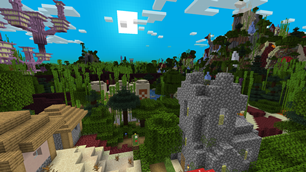
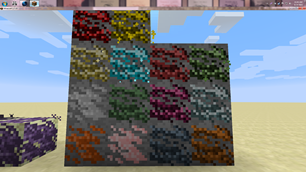
World Blender is a dimension filled with every single biome's features, structures, natural spawns, carvers (caves), and terrain surfaces shoved in! Even modded features and structures will be added to the dimension! However, some mods have hardcoded their features or structures to only spawn in their own dimensions or biomes but I will try and work out alternatives methods to get their stuff in this awesome dimension! But sometimes, those feature uses a config option to determine what dimension their stuff spawns in so if a mod's feature or structure is not spawning in World Blender's dimension, then take a look at the mod's config options first. If you still can't get it to spawn in the dimension, let me know so I can take a look and add it to my list of mods to try and be compatible with if it is possible. 🙂
Inside the dimension, you will find massive webs of different kinds of surfaces all filled to the brim with trees, grass, and structures. But take notice of the Nether surface path that has End surfaces on each side. That Nether path is the main walkway through the dimension as no other surfaces can interrupt that pathway. So follow that red road and explore the insanity of the world! Also, if you got modded ores mod on, all the ores will be added as well as long as they are able to spawn in Stone! And lastly, the biomes will have imported every mob's spawn entry so there's no telling what will spawn! Though animals seem to not spawn very often due to all the trees and plants covering all the Grass Blocks so you may have to burn down some forests or blacklist many plant features in the config to increase animal spawning.
And yes, the more worldgen mods you have on, the crazier World Blender's dimension becomes! It gets insane real fast! Though too many mods on and the dimension may become much slower to load. At that point, use my config and blacklist the most resource intensive worldgen stuff from other mods from being imported. World Blender requires customizing in the config for large modpacks in order to remain playable. Do note, the creation of the chunks at world origin in the dimension takes a bit of time to be generated as the Enderdragon stuff requires many chunks to be generated in a single tick.
Also, be sure to check out the images page for several screenshots of what the world looks like! And yes, you can use this mod in a modpack or download and modify the source code. It is all under LGPL (a license) so you can do whatever you want as long as you make your mod's codebase also open sourced.
______________________________________________________________________________
HOW DO I ENTER THIS WORLD?
To enter this highly, overpowered and broken dimension, you have to prove that you had traveled quite a lot and that you are in the endgame by placing 8 chests in a 2x2x2 area and then filling every slot with 1 of every block you can find! (Slots with the same item does not count. Items without block forms does not count. Having more than 1 kind of one block will not count as extra either.) Then when you are done, hold a Nether Star in your hand. Now crouch and right click any of the chests with the star to create the portal! The portal will consume the chests and the blocks inside as sacrifice! If this is too much to do, you can easily reduce the number of unique blocks required or what activation item is needed to make the portal by going into the configs. But once the portal is made, just walk into the portal after it has cooled down (not red anymore) and you'll enter the dimension with a new portal block at your feet to let you exit easily!
If you create the portal in a bad spot, you can right click the portal blocks while crouching and holding no items to vaporize the portal. Also in this crazy dimension, you can always leave it by heading to world origin as there will be quartz altar with an unbreakable portal block to always allow you to escape. The portal will always place you back to the Overworld when leaving the dimension so keep that in mind! And also, the portal can teleport any entity or dropped item but only one at a time and it will have a cooldown phase.
With commands active, you can enter the dimension faster by doing this command /execute in world_blender:world_blender run tp ~ 70 ~. And by default, features that contain lava or fire will not be imported so they do not create out of control fire spreading. You can turn off this config so fire features gets imported but if you do, I highly recommend you to do /gamerule doFireTick false so that fire does not go crazy rampant in this dimension and cause quite a bit of lag!
______________________________________________________________________________
HOW CAN I CONFIGURE THIS MOD?
This mod has 29 configs options total to allow you to customize this mod. The options are:
-turn on or off importing vanilla or mod's features, structures, carvers, surfaces, and natural mob spawns.
-quick toggles to disable bamboo, fire, and lava features from spawning to help reduce lag.
-surround floating liquid with solid blocks and placing solid blocks under blocks that can fall. This helps reduce lag from liquid flowing or blocks falling.
-place Obsidian blocks to separate lava tagged fluids from water tagged fluids underground.
-blacklist certain mod's or vanilla features, structures, carvers, surfaces, and natural mob spawns by using keywords, using the resource location (ID) of the thing itself, or using the resource location of the mod itself.
-print out all identifiers of everything registered to help you with making a blacklist easily.
-change how many kinds of blocks are needed to make the portal, specify required blocks that needs to be in the chests, what activation item(s) is needed, and whether the portal should drop the chests and its contents instead of consuming it.
-how wide the bands of blocks on the surface are and whether vanilla ravine and cave carvers can carve through modded blocks, Netherrack, and End Stone underground.
-spawn the Enderdragon at world origin in the dimension! Or not lol. It's on by default cause why not? The Dragon defends the Altar in the center!
The configs has more info on each of the options. Got more ideas or suggestions? Leave a comment below and I'll see if it can be done. Any changes you do to the config requires the world to be shut down and re-entered due to how it imports stuff from vanilla and other mod's biomes. And also, don't forget you can modify World Blender's dimension or biomes by Datapack too! Here's what you can override with datapacks: https://github.com/TelepathicGrunt/WorldBlender-Fabric/tree/master/src/main/resources/data/world_blender
And here's a datapack to swap World Blender's dimension with the Overworld dimension!
https://github.com/TelepathicGrunt/WorldBlender/releases/tag/0.0.1
______________________________________________________________________________
For the list of changes in this mod, click the Source tab and check out Changelog.md file.
This helps me keep track of what I had done so far.
*If you find an issue, glitch, or have a suggestion about my mod, let me know! But if you don't have a GitHub account to report in the Issue tab above, just comment what the problem is below and I'll try and get back to you ASAP! :)
Discord Link to #telepathicgrunt-mods channel for my mods! :
https://discord.gg/SM7WBT6FGu

Checkout this guy's mod spotlight of World Blender where if you go to 4:07, you can see a great example of how chaotic the world becomes when tons of mods are used together with World Blender! 😀


Add a comment